LeaferJS Releases New Animation, State, Transition, and Game Features
2024-09-20 "Fulfill Your Game Dreams"
Introduction
I remember that quite early on, many people said: “LeaferJS is so easy to use, I really want to try developing games with it.” At that time, I just smiled and thought, “We’re still far from making games.”
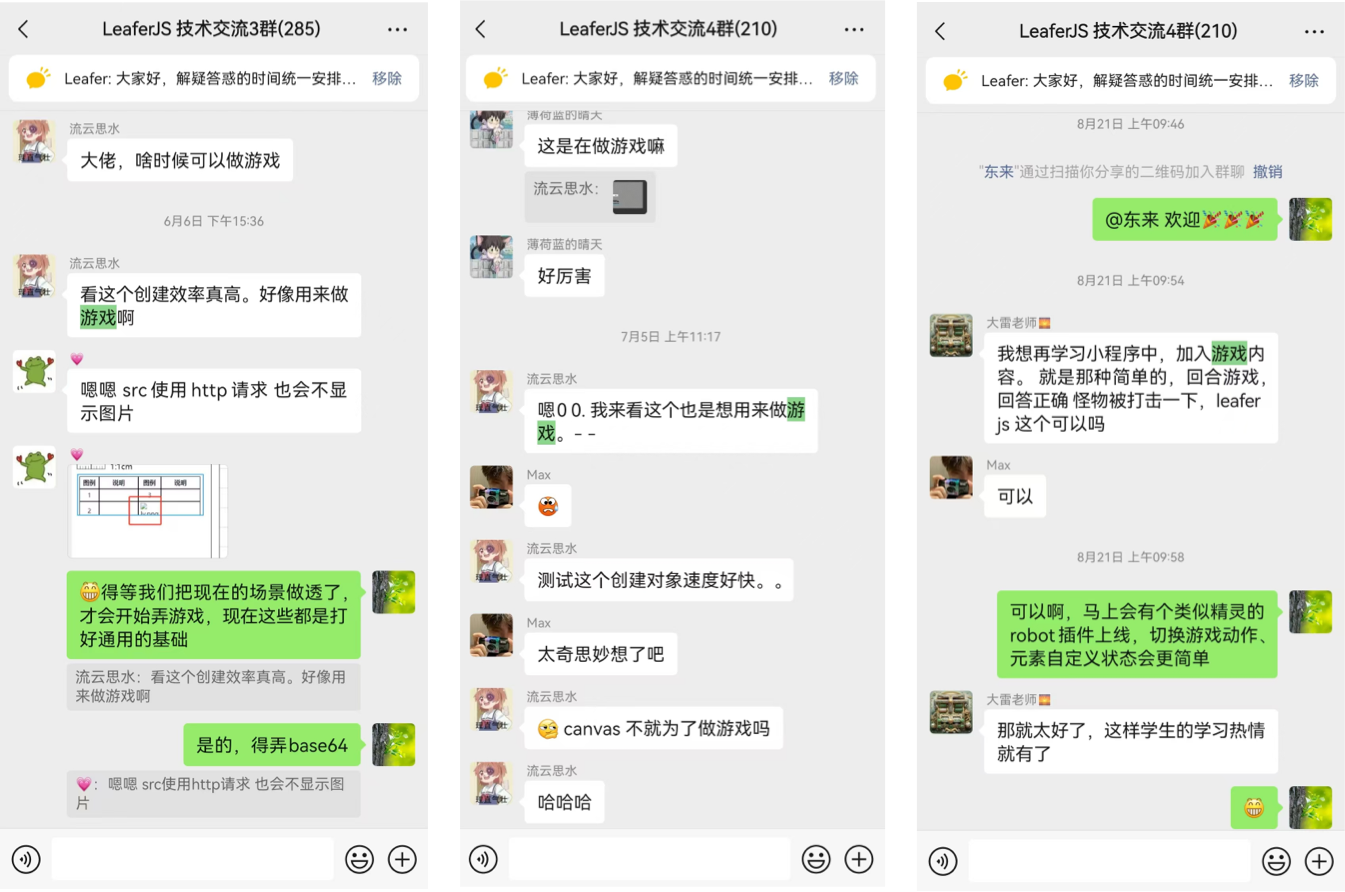
Although we didn’t provide dedicated support for game development, users’ curiosity couldn’t be stopped. Gradually, people started using LeaferJS to create interesting mini-games and share them in the community. For example, @Ziyang developed a series of mini-games and even wrote a tutorial 《Leafer Game Development - Puzzle》. At that time, I didn’t pay much attention to it.
Until one day, a user @hhzzcc, in pursuit of his game development dream, managed to build a Super Mario game using LeaferJS—even though the features were not yet complete. He also wrote a tutorial 《I Built a Super Mario Game with JS》, which was widely reposted across platforms. That’s when I realized how much users wanted to build games with LeaferJS.

So I accelerated development, focused intensely for over a month, and delivered this update featuring game, animation, state, and transition functionalities—hoping to make it easier for everyone to develop mini-games, animations, and UI components.
Overview
This update mainly includes four major sections. I will first explain the three foundational parts: animation, state, and transition, and then introduce the game section, which provides a Robot element similar to a game sprite.
Next, I will demonstrate through examples and code what these features can achieve and the new experiences they bring. Let’s start by enjoying a path animation example:
// #运动路径 [沿路径运动]
import { Group, Leafer, Path, Polygon } from 'leafer-ui'
import '@leafer-in/animate' // 导入动画插件
import '@leafer-in/motion-path' // 导入运动路径插件

const leafer = new Leafer({ view: window })

const group = new Group()

const path = new Polygon({
    x: 100,
    y: 100,
    motionPath: true, // 设置为运动路径,该 Group 内的其他元素都可以沿此路径运动
    points: [0, 90, 100, 60, 200, 80, 300, 40, 375, 50, 450, 10, 550, 90, 550, 90, 0, 90],
    curve: true,
    fill: '#32cd79',
})

const car = new Path({
    scale: 0.05,
    fill: '#FEB027',
    around: 'bottom',
    path: 'M949.586 629.224c-2.703-2.661-4.71-7.055-5.077-10.84-1.301-13.259-1.911-26.584-2.432-39.902-0.255-6.38-1.968-9.879-9.398-10.426-9.201-0.682-18.271-3.044-27.381-4.795-8.772-1.684-14.224-8.514-12.708-15.699 1.616-7.613 8.673-11.886 17.328-10.39 9.422 1.626 18.832 3.33 28.224 4.998 2.266-8.837-0.482-14.764-9.666-20.748-26.418-17.236-55.258-29.587-85.431-37.895-33.994-9.363-68.698-16.141-103.043-24.263-3.719-0.877-7.643-2.533-10.544-4.943-38.731-32.201-80.555-59.555-125.84-81.76-39.617-19.423-82.145-25.662-125.45-28.424-46.553-2.969-92.87-0.148-138.957 6.854-21.555 3.271-41.424 11.358-59.755 22.592-28.399 17.408-56.715 35.075-83.999 54.15-15.036 10.513-29.739 14.978-47.548 10.168-8.07-2.178-16.586-2.709-24.894-4.004-10.75-1.676-18.04 2.278-19.666 10.692-1.759 9.111 3.546 15.686 14.425 17.856 2.131 0.424 4.27 0.775 6.402 1.152 0.104 0.489 0.201 0.969 0.291 1.452-8.561 3.113-17.05 6.419-25.686 9.297-19.17 6.413-21.497 9.439-21.862 29.792-0.054 2.82-0.008 5.64-0.008 9.442 12.299 0 23.845-0.052 35.396 0.011 9.849 0.052 16.351 5.089 16.69 12.78 0.358 7.993-6.497 14.054-16.427 14.179-11.541 0.145-23.085 0.034-35.627 0.034 0 15.755-0.01 30.453 0 45.163 0.012 7.541-0.179 15.08 0.149 22.604 0.238 5.251-1.482 8.45-5.623 12.222-4.171 3.805-6.077 10.349-8.244 15.977-0.971 2.52 0.017 5.747-0.198 8.628-1.697 23.276 9.365 28.266 26.937 29.975 6.879 0.668 13.728 1.563 21.403 2.45-2.97-44.323 10.278-81.655 43.859-110.492 24.57-21.091 53.398-30.794 85.846-29.73 24.153 0.786 46.087 8.406 65.902 21.902 20.16 13.718 34.877 32.001 44.318 54.527 9.258 22.093 12.073 44.983 8.279 69.174H660.11c-5.864-48.677 9.189-89.301 47.71-119.794 26.652-21.102 57.782-28.826 91.558-25.087 60.437 6.677 122.165 65.992 107.31 150.752 12.938-2.104 25.373-3.916 37.706-6.305 2.579-0.503 5.102-2.809 7.047-4.865 9.141-9.619 7.555-39.181-1.855-48.461zM275.612 469.297c28.838-41.323 63.854-70.249 113.867-78.948 2.196 29.673 4.375 59.214 6.583 89.087-40.444-3.403-79.805-6.716-120.45-10.139z m179.897 71.126c-5.494 0.317-11.013 0.055-16.524 0.055v0.078c-5.506 0-11.013 0-16.527-0.003-0.575 0-1.154-0.039-1.73-0.13-7.911-1.247-13.83-7.818-13.216-14.659 0.61-6.893 6.516-12.017 14.546-12.153 11.013-0.181 22.046-0.3 33.051-0.011 8.454 0.211 14.175 5.82 14.375 13.248 0.195 7.312-5.532 13.081-13.975 13.575z m-30.098-58.221c-2.338-32.026-4.608-63.141-6.888-94.362 103.429-11.606 190.875 22.776 269.354 89.534-87.844 19.856-174.859 9.391-262.466 4.828zM236.91 570.114c-49.771-0.016-90.786 39.783-92.253 86.639-1.697 54.596 43.161 96.574 91.545 95.173 51.424-0.008 91.141-40.06 91.079-91.851-0.053-49.787-40.393-89.944-90.371-89.961z m-0.131 125.312c-17.785 0.532-34.806-15.951-35.104-33.997-0.307-18.086 15.924-34.542 34.257-34.748 18.157-0.192 34.65 16.176 34.635 34.365-0.024 17.843-15.75 33.839-33.788 34.38zM787.66 569.923c-53.395-1.601-95.199 41.641-94.92 90.003 0.29 51.36 39.759 91.973 90.084 91.992 52.573 0.038 92.121-39.199 92.188-91.492 0.07-48.553-40.287-89.095-87.352-90.503z m-3.893 125.425c-18.762-0.355-34.274-16.08-34.2-34.674 0.072-18.189 16.564-34.166 34.977-33.883 18.123 0.27 33.8 16.151 33.739 34.193-0.055 18.402-16.424 34.702-34.516 34.364z',
    motion: 0,
    animation: { // 沿 path 运动至 100%
        style: { motion: { type: "percent", value: 1 } },
        duration: 9,
        loop: true
    }
})

group.add(path)
group.add(car)

leafer.add(group)
1. Animation
This time, LeaferJS provides rich animation capabilities, supporting delay, looping, and seeking. You can use it to create transition animations, oscillation animations, keyframe animations, path animations, and scroll-driven animations. It supports creating animations via animation, transition, the animate() method, and Animate instances, among others.
1. Entry and Exit Animations
These can be used directly for page transition effects and for elements entering and leaving.
// #动画样式 [入场和出场动画 (Leafer)]
import { Group, Leafer, Frame } from 'leafer-ui'
import '@leafer-in/animate' // 导入动画插件

const leafer = new Leafer({ view: window })

const page1 = new Frame({
    x: 300,
    y: 100,
    width: 150,
    height: 100,
    fill: '#FEB027',
    animation: { // 入场动画
        keyframes: [{ opacity: 0, offsetX: -150 }, { opacity: 1, offsetX: 0 }],
        duration: 0.8
    },
    animationOut: { // 出场动画
        style: { opacity: 0, offsetX: 150 },
        duration: 0.8
    }
})

const page2 = page1.clone({ fill: '#32cd79' }) // 克隆 page 并重新设置fill

const group = new Group({ children: [page1] })

leafer.add(group)

// 切换页面, 自动执行入场、出场动画
setInterval(() => {

    if (page1.parent) {
        group.add(page2)
        page1.remove()
    } else {
        group.add(page1)
        page2.remove()
    }

}, 2000)
2. Oscillation Animation
Used to create back-and-forth swinging animation effects.
// #动画样式 [颜色过渡 (Leafer)]
import { Leafer, Rect } from 'leafer-ui'
import '@leafer-in/animate' // 导入动画插件

const leafer = new Leafer({ view: window })

const rect = new Rect({
    y: 100,
    cornerRadius: 50,
    fill: '#32cd79',
    animation: {
        style: { x: 500, cornerRadius: 0, fill: '#ffcd00' }, // style keyframe
        duration: 1,
        swing: true // 摇摆循环播放
    }
})

leafer.add(rect)
3. Keyframe Animation
Used to create complex timeline animations, allowing precise control over delay, duration, and easing for each frame.
// #动画样式 [关键帧动画 (Leafer)]
import { Leafer, Rect } from 'leafer-ui'
import '@leafer-in/animate' // 导入动画插件

const leafer = new Leafer({ view: window })

const rect = new Rect({
    x: 50,
    y: 100,
    cornerRadius: 50,
    fill: '#32cd79',
    around: 'center',
    animation: {
        keyframes: [
            { style: { x: 150, scaleX: 2, fill: '#ffcd00' }, duration: 0.5 },  // animate keyframe
            { style: { x: 50, scaleX: 1, fill: '#ffcd00' }, duration: 0.2 },
            { style: { x: 550, cornerRadius: 0, fill: '#ffcd00' }, delay: 0.1, easing: 'bounce-out' },
            { x: 50, rotation: -720, cornerRadius: 50 } // style keyframe
        ],
        duration: 3, // 自动分配剩余的时长给未设置 duration 的关键帧: (3 - 0.5 - 0.2 - 0.1) / 2
        loop: true,
        join: true //  加入动画前的元素状态作为 from 关键帧
    }
})

leafer.add(rect)
4. Path Animation
Allows elements to move along another path or draw along their own path. This feature is mostly completed and will be released as a standalone plugin after further testing and refinement—stay tuned!
// #运动路径 [自身描边动画]
import { Group, Leafer, Path, Rect } from 'leafer-ui'
import '@leafer-in/animate' // 导入动画插件
import '@leafer-in/motion-path' // 导入运动路径插件

const leafer = new Leafer({ view: window })

const group = new Group()

const path = new Path({
    x: 100,
    y: 100,
    scale: 0.2,
    motionPath: true, // 设置为运动路径,该 Group 内的其他元素都可以沿此路径运动
    stroke: '#32cd79',
    strokeWidth: 20,
    motion: 0,
    animation: {  // 沿 path 运动描边至 100%
        style: { motion: { type: "percent", value: 1 } },
        duration: 9,
        loop: true
    },
    path: 'M945.344 586.304c-13.056-93.44-132.48-98.048-132.48-98.048 0-29.888-39.808-47.424-39.808-47.424L201.664 440.832c-36.736 0-42.112 51.264-42.112 51.264 7.68 288 181.44 382.976 181.44 382.976l299.456 0c42.88-31.36 101.888-122.56 101.888-122.56 9.216 3.072 72.768-0.832 97.984-6.144C865.6 740.992 958.336 679.68 945.344 586.304zM365.568 825.28c-145.472-105.664-130.944-328.576-130.944-328.576l80.448 0c-44.416 126.4 43.648 285.696 55.872 307.904C383.232 826.816 365.568 825.28 365.568 825.28zM833.472 694.272c-37.568 22.272-65.152 7.68-65.152 7.68 39.04-54.4 42.112-159.296 42.112-159.296 6.848 2.304 12.288-26.048 61.312 23.744C920.768 616.128 871.04 672.064 833.472 694.272z M351.68 129.856c0 0-119.424 72.832-44.416 140.928 75.008 68.16 68.16 93.44 24.512 153.216 0 0 81.92-41.344 71.168-104.192s-89.6-94.208-72.768-137.792C347.136 138.304 351.68 129.856 351.68 129.856z M615.232 91.648c0 0-119.488 72.832-44.352 140.928 74.944 68.16 68.032 93.44 24.448 153.216 0 0 81.984-41.344 71.232-104.192-10.688-62.784-89.6-94.208-72.832-137.792C610.624 100.032 615.232 91.648 615.232 91.648z M491.136 64c0 0-74.304 6.144-88.128 78.144C389.248 214.144 435.968 240.96 471.936 276.992 507.904 312.96 492.608 380.352 452.032 427.904c0 0 72.768-25.344 89.6-94.976 16.832-69.76-17.344-94.272-52.8-134.784C453.312 157.504 456.64 83.968 491.136 64z',
})

const pen = new Rect({
    width: 15,
    height: 50,
    cornerRadius: 10,
    fill: '#FEB027',
    around: 'bottom',
    motion: 0,
    motionRotation: 45,
    animation: { // 沿 path 运动至 100%
        style: { motion: { type: "percent", value: 1 } },
        duration: 9,
        loop: true
    }
})

group.add(path)
group.add(pen)

leafer.add(group)
5. Scroll-driven Animation
You may have seen websites where elements animate automatically as you scroll. This is scroll-driven animation, where the animation playback is controlled by the scrollbar or element movement. Coming soon.
2. State
Similar to CSS, you can add interactive state styles such as hover, press, focus, selected, and disabled to elements. You can also predefine complex state configurations for easy switching. Parent elements can enable the button property to allow child elements to automatically synchronize interaction states.
1. Button States
// #交互状态 [同步 hover 状态的按钮 (Leafer)]
import { Leafer, Box } from 'leafer-ui'
import '@leafer-in/state' // 导入交互状态插件
const leafer = new Leafer({ view: window, fill: '#333' })
const box = new Box({
x: 100,
y: 100,
fill: '#FEB027',
cornerRadius: 5,
button: true, // 标记为按钮,子元素 Text 将自动同步交互状态
hoverStyle: { fill: '#32cd79' }, // 鼠标hover状态
pressStyle: { fill: '#FF4B4B' }, // 鼠标按下状态
2. Click to Toggle Custom State
// #自定义状态 [切换状态 (Leafer)]
import { Leafer, Rect } from 'leafer-ui'
import '@leafer-in/state' // 导入交互状态插件
import '@leafer-in/animate' // 导入动画插件

const leafer = new Leafer({ view: window })

const rect = new Rect({
    width: 100,
    height: 100,
    fill: '#32cd79',
    cornerRadius: 30,
    origin: 'center',
    states: { // 自定义状态列表
        color: { fill: '#FEB027' },
        rotate: { animation: { keyframes: [{ rotation: 45 }, { rotation: 135, scale: 1.2 }], duration: 1, swing: true } }
    },
    state: 'color', // 设置状态
    transition: 1
})

leafer.add(rect)

rect.on('click', () => { // 点击切换状态
    rect.state = rect.state === 'color' ? 'rotate' : 'color'
})
3. Transition
Similar to CSS transitions, but LeaferJS transitions only apply to state changes and are not triggered by individual property changes (providing better control). You can define transition animations separately for entering and exiting states. By default, LeaferJS automatically enables transition effects for switching between state, hover, press, focus, selected, and disabled.
1. Button Interaction Transition Effects
Smooth transitions between different interaction states for a more fluid user experience.
// #过渡效果 [按钮交互 (Leafer)]
import { Leafer, Box } from 'leafer-ui'
import '@leafer-in/state' // 导入交互状态插件
import '@leafer-in/animate' // 导入动画插件

const leafer = new Leafer({ view: window })

const box = new Box({
    x: 100,
    y: 100,
    fill: '#32cd79',
    cornerRadius: 5,
    origin: 'center', // 从中心缩放

    button: true, // 标记为按钮,子元素 Text 将自动同步交互状态
    hoverStyle: { // 鼠标hover状态
        fill: '#FF4B4B',
        scale: 1.5,
        cornerRadius: 20,
    },
    pressStyle: { // 鼠标按下状态
        fill: '#FEB027',
        scale: 1.1,
        transitionOut: 'bounce-out' // 退出状态时的过渡方式
    },

    children: [{
        tag: 'Text',
        text: 'Button',
        fontSize: 16,
        fontWeight: 'bold',
        padding: [10, 20],
        fill: 'rgba(0,0,0,0.5)',
        hoverStyle: { fill: 'black' } // 鼠标 hover 到 button 上的状态
    }]
})

leafer.add(box)
2. Complex Gradient Transitions
Transitions from solid colors to gradients, as well as between different gradient types. This feature is mostly completed and will be released as a standalone plugin after further testing and refinement—stay tuned!
// #动画样式 [渐变颜色过渡]
import { Leafer, Rect } from 'leafer-ui'
import '@leafer-in/state' // 导入交互状态插件
import '@leafer-in/animate' // 导入动画插件
import '@leafer-in/transition'

const leafer = new Leafer({ view: window })

const rect = new Rect({
    x: 100,
    y: 100,
    width: 100,
    height: 100,
    cornerRadius: 30,
    fill: {
        type: 'linear',
        stops: ['#FEB027', '#79CB4D']
    },
    hoverStyle: {
        fill: {
            type: 'radial',
            from: 'top',
            stops: ['#FF4B4B', '#FEB027']
        }
    },
    transition: 1
})

leafer.add(rect)
4. Game
Previously, the most lacking feature for game development was a sprite element capable of automatically playing action frames for switching character animations. Other functionalities can be achieved by integrating third-party libraries—for example, the physics engine Matter.js is recommended. It is easy to use, feature-rich, and capable of simulating various physical effects.
Robot Element
The Robot element is similar to a sprite in games. It integrates frame playback and predefined actions, allowing you to quickly create game characters with walking and attacking animations.
First, you need to provide a sprite sheet containing all game actions. These actions will be automatically indexed, as shown below:
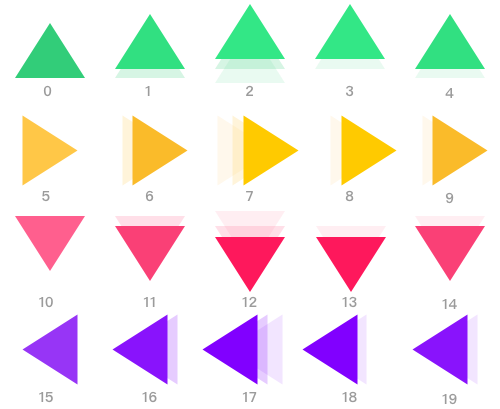
By loading and parsing the sprite sheet, you will obtain a game element that can freely switch between actions.
// #创建 Robot 游戏元素
import { Leafer, KeyEvent } from 'leafer-ui'
import { Robot } from '@leafer-in/robot' // 导入 robot 插件

const leafer = new Leafer({ view: window })

const robot = new Robot({
    robot: { url: '/image/arrows.png', size: { width: 100, height: 100 }, total: 20 },
    actions: {  // 预设游戏动作(通过动作帧)
        up: 0, // 静止向上的箭头( 编号为0的动作帧)
        right: 5,
        down: 10,
        left: 15,
        arrowUp: [0, 1, 2, 3, 4], // 动态向上的箭头(循环播放编号为 1-4 的动作帧)
        arrowRight: [5, 6, 7, 8, 9],
        arrowDown: [10, 11, 12, 13, 14],
        arrowLeft: [15, 16, 17, 18, 19]
    },
    action: 'arrowRight' // 设置动作:动态向右的箭头
})

leafer.add(robot)

// 监听方向键进行交互

let speed = 5

leafer.on(KeyEvent.DOWN, (e: KeyEvent) => {
    speed++
    switch (e.code) { // 动态的方向箭头
        case 'ArrowUp':
            robot.action = 'arrowUp'
            robot.y -= speed
            break
        case 'ArrowDown':
            robot.action = 'arrowDown'
            robot.y += speed
            break
        case 'ArrowLeft':
            robot.action = 'arrowLeft'
            robot.x -= speed
            break
        case 'ArrowRight':
            robot.action = 'arrowRight'
            robot.x += speed
            break
    }
})

leafer.on(KeyEvent.UP, (e: KeyEvent) => {
    speed = 5
    switch (e.code) { // 静态的方向箭头
        case 'ArrowUp':
            robot.action = 'up'
            break
        case 'ArrowDown':
            robot.action = 'down'
            break
        case 'ArrowLeft':
            robot.action = 'left'
            break
        case 'ArrowRight':
            robot.action = 'right'
            break
    }
})
Run Example Code
The example code above can be run directly using the online Playground environment provided through our collaboration with Cloud Studio.
LeaferJS Is Being Seen by More People
For developers who have a “game dream,” LeaferJS is definitely a powerful tool that allows you to get started easily and bring your ideas to life.

The image shows Megan Zhang, Product Manager of Cloud Studio, recommending LeaferJS at the Tencent Global Digital Ecosystem Conference.
For users developing graphic editing applications, there’s no need to worry—LeaferJS continues to focus on drawing, interaction, and graphic editing scenarios at this stage. Introducing game scenarios is simply to let more people discover LeaferJS and unlock its full potential.
We will continue to push forward our vision and help more users create powerful and practical productivity tools.
Summary
In this update, LeaferJS brings you brand-new game, animation, state, and transition features to help you realize your childhood game development dreams. We’ve introduced rich animation effects such as oscillation animations, keyframe animations, and path animations (coming soon), along with practical transition features and flexible game elements—enabling you to easily create dynamic game characters and engaging page effects.
These features not only make development more efficient but also empower you to create visually impactful works. More exciting community game projects and tutorials will be released soon, and I will also be involved—stay tuned, and see you in the next update!
Media Sharing
OSC Open Source Community - OSChina
Web Workshop Guide
Share with Friends