
Get Bounding Box
When drawing shapes with the mouse, or performing alignment and rectangle collision detection, we need to obtain the actual position and size of an element (its bounding box) for subsequent operations.
Bounding Box Model
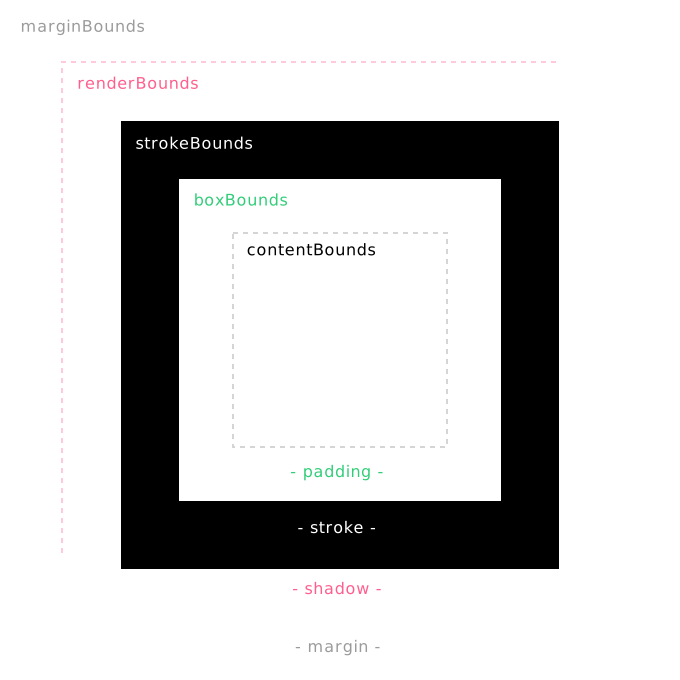
The diagram shows different types of bounding boxes formed from inside to outside of an element. Each bounding box includes position (x, y) and size (width, height), similar to the CSS box model.
margin bounding box
Outer boundary: base bounds + margin.
render bounding box
Render boundary: stroke bounds + shadow, etc.
stroke bounding box
Stroke boundary: base bounds + stroke, defines the interactive hit area.
box bounding box
Base boundary: includes padding, and serves as the reference for inward and outward expansion.
content bounding box
Content boundary: bounds of the filled content, excluding padding. Typically used to measure the actual text size of Text.
OBB and AABB
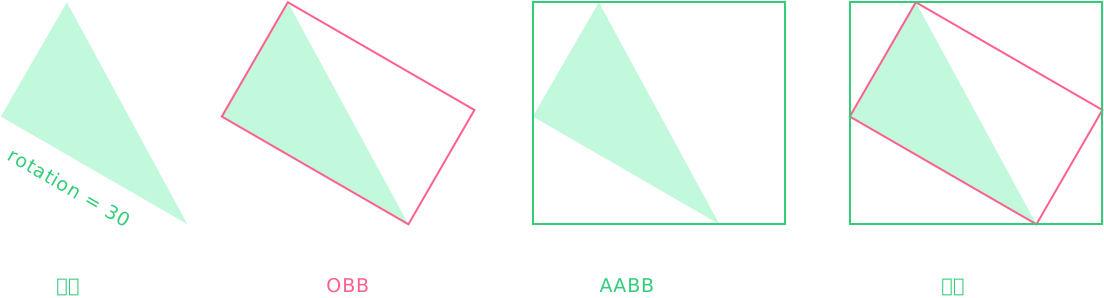
When an element is rotated, different OBB and AABB bounding boxes are formed in different coordinate systems.
Examples
We use a shape creation example to understand the interaction between bounding boxes and coordinate systems
Press and drag the mouse to start drawing a rectangle, release to finish. After zooming or panning the view, new rectangles can still be drawn accurately.
// #图形编辑器 [创建图形 - 进入绘制模式]
import { App, DragEvent, Rect } from 'leafer-ui'
import '@leafer-in/editor' // 导入图形编辑器插件
import '@leafer-in/viewport' // 导入视口插件 (可选)


const app = new App({ view: window, editor: {}, fill: '#333' })

app.tree.add({ tag: 'Text', x: 100, y: 100, text: '2秒后进入绘制模式,按下鼠标拖动可创建矩形,10 秒后再回到正常模式', fill: '#999', fontSize: 16 })


app.tree.add(Rect.one({ editable: true, fill: '#FEB027', cornerRadius: [20, 0, 0, 20] }, 100, 300))
app.tree.add(Rect.one({ editable: true, fill: '#FFE04B', rotation: 10, cornerRadius: [0, 20, 20, 0] }, 300, 300))

app.editor.select(app.tree.children[2])

setTimeout(() => {

    // 2秒后进入绘制模式
    app.mode = 'draw'

    // 创建矩形(拖拽)
    let rect: Rect

    const events = [
        app.on_(DragEvent.START, () => {
            rect = new Rect({ editable: true, fill: '#32cd79' })
            app.tree.add(rect)
        }),

        app.on_(DragEvent.DRAG, (e: DragEvent) => {
            if (rect) rect.set(e.getPageBounds()) // 获取事件在 page 坐标系中绘制形成的包围盒
        })]


    setTimeout(() => {

        app.off_(events)

        // 10 秒后回到正常模式
        app.mode = 'normal'

    }, 10000)

}, 2000)// #图形编辑器 [创建图形 - 进入绘制模式]
import { App, DragEvent, Rect } from 'leafer-ui'
import '@leafer-in/editor' // 导入图形编辑器插件
import '@leafer-in/viewport' // 导入视口插件 (可选)
const app = new App({ view: window, editor: {}, fill: '#333' })
app.tree.add({ tag: 'Text', x: 100, y: 100, text: '2秒后进入绘制模式,按下鼠标拖动可创建矩形,10 秒后再回到正常模式', fill: '#999', fontSize: 16 })
app.tree.add(Rect.one({ editable: true, fill: '#FEB027', cornerRadius: [20, 0, 0, 20] }, 100, 300))
app.tree.add(Rect.one({ editable: true, fill: '#FFE04B', rotation: 10, cornerRadius: [0, 20, 20, 0] }, 300, 300))
app.editor.select(app.tree.children[2])
setTimeout(() => {
// 2秒后进入绘制模式
app.mode = 'draw'
// 创建矩形(拖拽)
let rect
const events = [
app.on_(DragEvent.START, () => {
rect = new Rect({ editable: true, fill: '#32cd79' })
app.tree.add(rect)
}),
app.on_(DragEvent.DRAG, (e) => {
if (rect) rect.set(e.getPageBounds()) // 获取事件在 page 坐标系中绘制形成的包围盒
})]
setTimeout(() => {
app.off_(events)
// 10 秒后回到正常模式
app.mode = 'normal'
}, 10000)
}, 2000)Detect whether bounding boxes of elements collide
// #元素包围盒 [检测 rect2 是否与 rect1 碰撞]
import { Leafer, Frame, Rect, DragEvent, Bounds } from 'leafer-ui'

const leafer = new Leafer({ view: window, fill: '#333' })

const rect1 = Rect.one({ fill: '#FEB027', draggable: true }, 100, 100)

leafer.add(Frame.one({ children: [rect1] }, 100, 100, 500, 600)) // rect1 在 frame 内

const rect2 = Rect.one({ fill: '#FFE04B', draggable: true }, 200, 50)  // rect2 在 frame 外

leafer.add(rect2)

// 检测 rect2 是否与 rect1 碰撞 (通过世界坐标中的 box 包围盒跨层级检测)
rect2.on(DragEvent.DRAG, () => {

    const rect2Bounds = new Bounds(rect2.worldBoxBounds)
    rect1.stroke = rect2Bounds.hit(rect1.worldBoxBounds) ? 'blue' : '' // 碰撞则显示蓝色边框

})
Access Methods
Access via events
Access via element properties
| Name | Description |
|---|---|
| boxBounds | Base bounds of the element in inner coordinate system (OBB bounding box) |
| renderBounds | Render bounds of the element in inner coordinate system (AABB bounding box) |
| worldBoxBounds | Base bounds of the element in world coordinate system (AABB bounding box) |
| worldRenderBounds | Render bounds of the element in world coordinate system (AABB bounding box) |
| getBounds() | Get AABB bounding box |
| getLayoutBounds() | Get OBB bounding box, including scale, rotation and layout transforms |
| getLayoutPoints() | Get the four corner points of the OBB bounding box |