
Creating the Leafer Engine
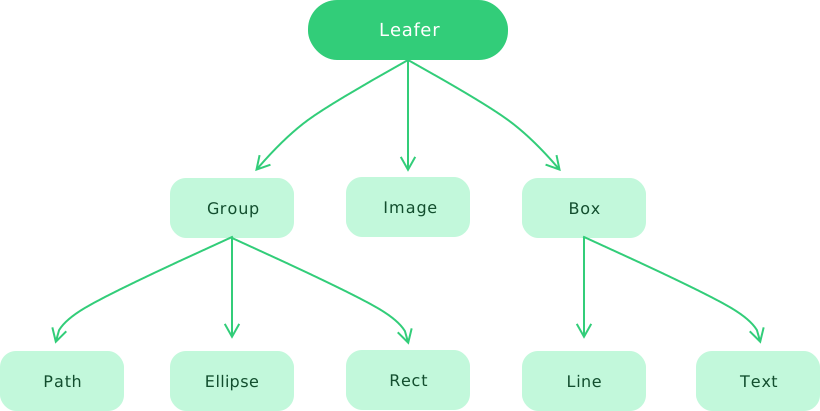
The Leafer engine is a tree-structured system (providing layout, rendering, and other management capabilities) that can run independently. As the root node, you can add child elements to it, and child elements can be further nested through Group / Box, forming a complex rendering tree.
Creating a Fixed-Size Leafer
The view parameter supports window, div, and canvas DOM elements. Note that when view is an id string, you do not need to include the # symbol.
// #创建固定宽高的 Leafer [div]
import { Leafer, Rect } from 'leafer-ui'

const div = document.createElement('div')
document.body.appendChild(div)

const leafer = new Leafer({
    view: div, // view 参数支持设置 div 标签对象
    width: 600, // 不能设置为 0, 否则会变成自动布局
    height: 600,
    fill: '#333'
})

leafer.add(Rect.one({ fill: '#32cd79', draggable: true }, 100, 100))// #创建固定宽高的 Leafer [canvas]
import { Leafer, Rect } from 'leafer-ui'
const canvas = document.createElement('canvas')
document.body.appendChild(canvas)
const leafer = new Leafer({
view: canvas, // view 参数支持设置 canvas 标签对象
width: 600, // 不能设置为 0, 否则会变成自动布局
height: 600,
fill: '#333'
})
leafer.add(Rect.one({ fill: '#32cd79', draggable: true }, 100, 100))// #创建固定宽高的 Leafer [id]
import { Leafer, Rect } from 'leafer-ui'
const div = document.createElement('div')
div.setAttribute('id', 'leafer-view')
document.body.appendChild(div)
const leafer = new Leafer({
view: 'leafer-view', // view 参数支持使用id字符串(不用加 # 号)
width: 600, // 不能设置为 0, 否则会变成自动布局
height: 600,
fill: '#333'
})
leafer.add(Rect.one({ fill: '#32cd79', draggable: true }, 100, 100))Creating an Auto-Layout Leafer
When the parent element size of the canvas changes, it will automatically resize. Learn more.
If the provided view is a div, that div will be used as the auto-layout container (the div must have auto width/height information).
If the provided view is a canvas, the parent element of the canvas will be used as the auto-layout container.
Creating a Growing Leafer
The canvas size will grow and automatically fit the actual content, useful for quickly embedding Leafer elements into HTML. Learn more.
Note that this feature is not currently supported in the App structure.