
bounds
Element boundary properties (bounding box). You can work with bounds via the Bounds class.
Read-only Properties
The foundation of layout, calculated from the element’s width, height, stroke, and shadow.
boxBounds: IBoundsData
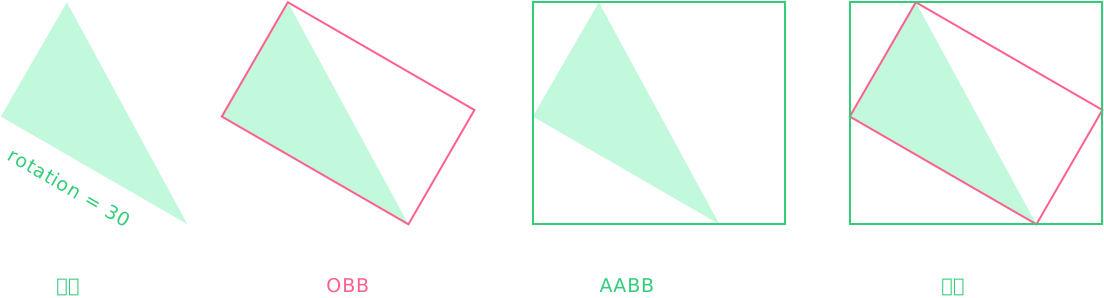
The element’s base bounds in the internal coordinate system (OBB bounding box).
renderBounds: IBoundsData
The element’s render bounds in the internal coordinate system (AABB bounding box).
worldBoxBounds: IBoundsData
The element’s base bounds in the world coordinate system (AABB bounding box).
Calculated from boxBounds multiplied by worldTransform. If the element is rotated, this is the new bounding box after rotation.
worldRenderBounds: IBoundsData
The element’s render bounds in the world coordinate system (AABB bounding box).
Derived From
width: number
The width of the element.
For elements or Groups that do not support direct setting, you can adjust it via resizeWidth(), and get the actual width via boxBounds.
height: number
The height of the element.
For elements or Groups that do not support direct setting, you can adjust it via resizeHeight(), and get the actual height via boxBounds.
Auxiliary Properties
renderSpread: IFourNumber
Forcibly expands the render bounds to prevent rendering artifacts caused by incorrect bounds calculation (e.g. for text). Default is 0.
renderSpread: [20, 10, 20, 10] // [top, right, bottom, left]
renderSpread: [20, 10, 20] // [top, (right-left), bottom]
renderSpread: [20, 10] // [(top-bottom), (right-left)]
renderSpread: 20 // all
Others
Paths, text, and points will automatically calculate their resulting width and height.
Key Methods
For performance and safety reasons, returned data is read-only.
getBounds ( type: IBoundsType = 'box', relative?: ILocationType | UI = 'world' ): IBoundsData
Get the element’s AABB bounding box.
You can retrieve different bounds types in different coordinate systems. The relative parameter can specify a coordinate system or a reference element.
getLayoutBounds ( type: IBoundsType = 'box', relative?: ILocationType | UI = 'world', unscale?: boolean ): ILayoutBoundsData
Get the element’s OBB bounding box, including layout properties such as scaling and rotation.
You can set unscale = true to convert scale into width and height, though mirrored cases with scaleX / scaleY = -1 may still exist.
getLayoutPoints ( type: IBoundsType = 'box', relative: ILocationType | UI = 'world' ): IPointData[]
Get the four corner points of the element’s OBB bounding box: [topLeft, topRight, bottomRight, bottomLeft].
type ILocationType = 'world' | 'page' | 'local' | 'inner' // coordinate systems
type IBoundsType = 'content' | 'box' | 'stroke' | 'margin' | 'render' // bounds types

rect.getBounds('box', 'local')
rect.getLayoutBounds('box', 'inner')
rect.getLayoutPoints('box', rect.leafer)

// Use with Bounds
new Bounds(rect.getBounds('box', 'local'))
Bounds Conversion
getWorldBounds ( inner: IBoundsData, relative?: UI, change?: boolean): IBoundsData
Get bounds in the world coordinate system (AABB). Pass in bounds from the internal coordinate system for conversion.
Second optional parameter: relative?: UI
Treat the relative element as the world coordinate system to convert from a child to any parent coordinate system.
Third optional parameter: change?: boolean
Modify the input bounds directly and return it to avoid creating a new object.
Belongs to
UI Elements
Example
Detect bounding box collision between elements
// #元素包围盒 [检测 rect2 是否与 rect1 碰撞]
import { Leafer, Frame, Rect, DragEvent, Bounds } from 'leafer-ui'

const leafer = new Leafer({ view: window, fill: '#333' })

const rect1 = Rect.one({ fill: '#FEB027', draggable: true }, 100, 100)

leafer.add(Frame.one({ children: [rect1] }, 100, 100, 500, 600)) // rect1 在 frame 内

const rect2 = Rect.one({ fill: '#FFE04B', draggable: true }, 200, 50)  // rect2 在 frame 外

leafer.add(rect2)

// 检测 rect2 是否与 rect1 碰撞 (通过世界坐标中的 box 包围盒跨层级检测)
rect2.on(DragEvent.DRAG, () => {

    const rect2Bounds = new Bounds(rect2.worldBoxBounds)
    rect1.stroke = rect2Bounds.hit(rect1.worldBoxBounds) ? 'blue' : '' // 碰撞则显示蓝色边框

})