
Setting Styles
Initial Style
Create a rectangle with a dashed border style.
Modify Style
Simple Update
Reset Style
Modifying Objects
Note
Elements can only detect first-level property setter changes. Directly modifying rect.fill.url = url will not trigger a re-render.
// #修改样式 [修改对象]
import { Leafer, Rect } from 'leafer-ui'

const leafer = new Leafer({ view: window })

const rect = new Rect({
    fill: {
        type: 'image',
        url: '/image/leafer.jpg',
    }
})

leafer.add(rect)

// 修改对象
setTimeout(() => {
    // 元素只能检测到 第一层级属性 的 setter 变化
    // 需要给 fill 再次赋值, 单独修改 rect.fill.url = url 不会渲染更新
    rect.fill = {
        type: 'image',
        url: '/image/arrows.png',
    }
}, 1000)
Using JSON
Learn about JSON data import and export.
// #修改数据 [使用 JSON (Leafer)]
import { Group, Leafer } from 'leafer-ui'
const leafer = new Leafer({ view: window })
const group = new Group()
leafer.add(group)
const json = { "x": 20, "y": 20, "children": [{ "tag": "Rect", "x": 100, "y": 100, "width": 200, "height": 200, "fill": "#32cd79", "draggable": true }] }
Introduction to Element Appearance Styles
fill
Fill, similar to background-color in HTML5 or color for text.
Supports solid color, linear gradient, radial gradient, angular gradient, and image fill. Multiple fills can be stacked.
stroke
Stroke, similar to border-color in HTML5.
Supports solid color, linear gradient, radial gradient, angular gradient, and image pattern. Multiple strokes and sub-stroke styles are supported.
Further stroke styling options are supported:
| Name | Description | Value |
|---|---|---|
| strokeAlign | Stroke alignment | 'inside', 'center', 'outside' |
| strokeWidth | Stroke width | number |
| strokeScaleFixed | Whether stroke width is fixed (not affected by zoom) | 'zoom-in', number, boolean |
| strokeCap | Stroke line cap style | 'none', 'round', 'square' |
| strokeJoin | Stroke corner style | 'miter', 'bevel', 'round' |
| dashPattern | Dashed stroke pattern | number[] |
| dashOffset | Dash offset | number |
// #描边样式
import { Leafer, Line } from 'leafer-ui'

const leafer = new Leafer({ view: window })

const rect = new Line({
    y: 100,
    stroke: '#32cd79',
    strokeWidth: 5, // 描边的宽度
    strokeScaleFixed: true, // 是否固定线宽(不受视图放大影响)
    strokeAlign: 'center', // 描边的对齐方式 'inside'、'center' 、'outside'
    strokeCap: 'round', // 描边的端点形状 'none' 、'round' 、'square'
    strokeJoin: 'round', // 描边的拐角处理 'miter' 、'bevel' 、'round'
    dashPattern: [15, 15], // 绘制虚线
    dashOffset: 15,	// 虚线描边的起点偏移值
})

leafer.add(rect)
shadow
Outer shadow of an element, supports multiple stacked shadows and box-shadow-like effects.
innerShadow
Inner shadow of an element, supports multiple inner shadows.
mask
Masking feature: assign an element inside a Group as a mask to create complex clipping effects. Supports 5 mask types.
// #遮罩功能 [将圆环设为遮罩 (Leafer)]
import { Leafer, Group, Ellipse, Image } from 'leafer-ui'

const leafer = new Leafer({ view: window })

const group = new Group({ x: 100, y: 100 })

const mask = new Ellipse({
    width: 100,
    height: 100,
    innerRadius: 0.5,
    fill: 'black',
    mask: true
})

const image = new Image({
    width: 100,
    height: 100,
    url: '/image/leafer.jpg'
})

leafer.add(group)

group.add([mask, image])
eraser
Eraser feature: assign an element inside a Group as an eraser to create complex erase effects. Supports 2 eraser types.
// #擦除功能 [将圆环设为橡皮擦 (Leafer)]
import { Leafer, Group, Ellipse, Image } from 'leafer-ui'

const leafer = new Leafer({ view: window })

const group = new Group({ x: 100, y: 100, draggable: true })

const image = new Image({
    width: 100,
    height: 100,
    cornerRadius: 30,
    url: '/image/leafer.jpg'
})

const eraser = new Ellipse({
    x: 15,
    y: 15,
    width: 70,
    height: 70,
    innerRadius: 0.5,
    fill: 'black',
    eraser: true,
    draggable: true
})

leafer.add(group)

group.add([image, eraser])
Element Visibility
visible
Element visibility, used to hide elements.
opacity
Element opacity.
Advanced Positioning Properties
origin
Rotate and scale elements around the origin point, similar to CSS transform-origin.
// #原点 [围绕原点旋转 45 度 (Leafer)]
import { Leafer, Rect, Frame } from 'leafer-ui'

const leafer = new Leafer({ view: window })

const rect = new Rect({
    x: 25,
    y: 25,
    width: 50,
    height: 50,
    origin: 'center',
    rotation: 45,
    draggable: true,
    fill: '#4DCB71'
})

leafer.add(new Frame({ width: 100, height: 100, fill: '#FF4A2C', children: [rect] }))
around
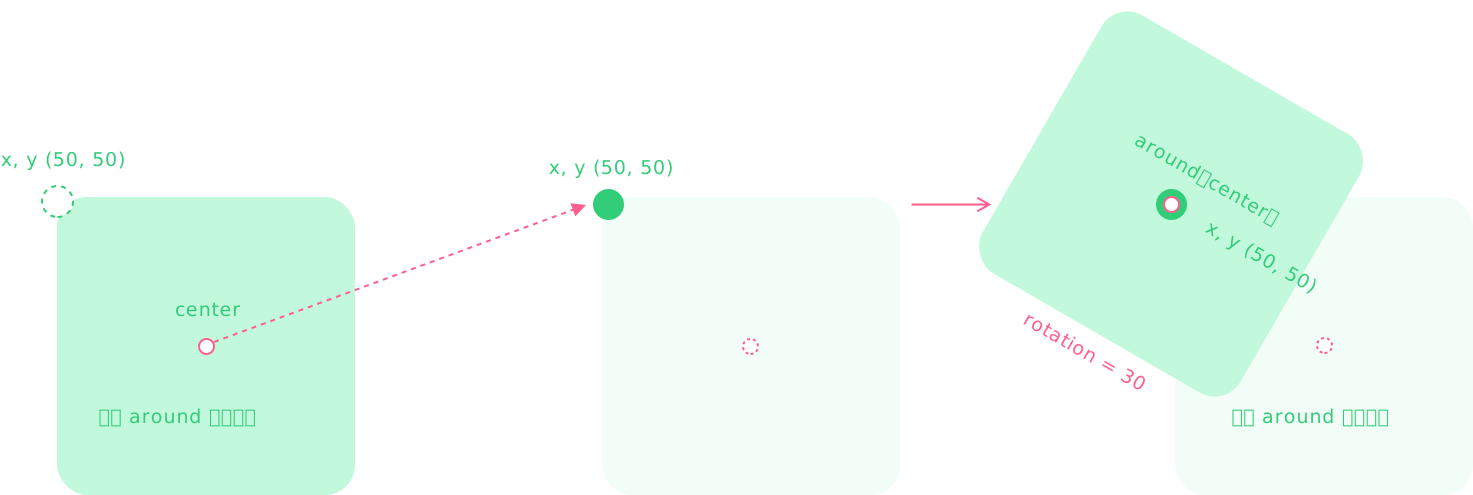
Draw elements around the around point, similar to the anchor system in game engines.
Difference from origin: it adds an extra step that moves the element's internal around point to the element's (x, y) coordinate.
// #around 属性 [围绕坐标(50,50) 为中心旋转 45 度 (Leafer)]
import { Leafer, Rect, Frame } from 'leafer-ui'

const leafer = new Leafer({ view: window })

const rect = new Rect({
    x: 50,
    y: 50,
    width: 50,
    height: 50,
    around: 'center',
    rotation: 45,
    fill: '#4DCB71',
    draggable: true
})

leafer.add(new Frame({ width: 100, height: 100, fill: '#FF4A2C', children: [rect] }))
Overview of Common Element Properties
| Name | Description |
|---|---|
| Identifier | |
| id | Unique id of the element |
| tag | Element tag name (i.e. class name of the element) |
| name | Element name |
| className | Class name, currently supports only 1 value |
| innerId | Runtime generated temporary id (incremental), cannot be used for remote storage |
| innerName | Runtime generated temporary name, used for quick element identification |
| Layout | |
| x | X-axis position |
| y | Y-axis position |
| width | Width |
| height | Height |
| isAutoWidth | Whether it is auto width |
| isAutoHeight | Whether it is auto height |
| lockRatio | Whether to lock aspect ratio of the element, requires resize plugin |
| scaleX | X-axis scale factor, negative value means mirroring on X axis |
| scaleY | Y-axis scale factor, negative value means mirroring on Y axis |
| scaleFixed | Fix global scale of the element, not affected by viewport zoom |
| scale | Quick set / get scaleX, scaleY |
| rotation | Rotation angle |
| skewX | X-axis skew angle |
| skewY | Y-axis skew angle |
| offsetX | X-axis offset |
| offsetY | Y-axis offset |
| origin | Rotate/scale around origin, same as CSS transform-origin |
| around | Draw element around a point, similar to anchor point in game engines |
| Bounding Box | |
| boxBounds | Base bounds in internal coordinate system (OBB) |
| renderBounds | Render bounds in internal coordinate system (AABB) |
| worldBoxBounds | Base bounds in world coordinate system (AABB) |
| worldRenderBounds | Render bounds in world coordinate system (AABB) |
| renderSpread | Force expand render bounds to avoid incorrect text measurement rendering issues |
| Transform | |
| worldTransform | Transform matrix in world coordinate system, includes scaleX/scaleY |
| localTransform | Transform matrix relative to parent |
| Appearance | |
| zIndex | Stack order within parent |
| opacity | Opacity |
| worldOpacity | Global opacity (affected by parent hierarchy) |
| visible | Visibility of element |
| fill | Fill, similar to HTML background-color or text color. Supports solid, linear gradient, radial gradient, angular gradient, image pattern, etc. Multiple fills can be stacked |
| stroke | Stroke, similar to HTML border-color. Supports multiple paint types and stacking |
| strokeAlign | Stroke alignment |
| strokeWidth | Stroke width |
| strokeScaleFixed | Whether stroke width is fixed (not affected by zoom) |
| strokeCap | Stroke line cap |
| strokeJoin | Stroke line join |
| dashPattern | Dashed stroke pattern |
| dashOffset | Dash offset |
| shadow | Outer shadow, supports multiple shadows (box-shadow like) |
| innerShadow | Inner shadow, supports multiple shadows |
| dim | Dim element, used with bright, requires highlight plugin |
| dimskip | Skip dimming and highlight element, used with dim, requires highlight plugin |
| bright | Highlight element, rendered on top layer, used with dim, requires highlight plugin |
| mask | Set as mask |
| eraser | Set as eraser |
| blendMode | Blend mode |
| Interaction | |
| hittable | Whether element responds to pointer/touch events (like CSS pointer-events) |
| hitChildren | Control interactivity of children |
| hitSelf | Control interactivity of self |
| hitFill | Hit detection for fill (pixel-level detection supported for PNG/SVG) |
| hitStroke | Hit detection for stroke |
| editable | Whether element is editable, requires editor plugin |
| draggable | Whether element is draggable |
| dragBounds | Limit drag range |
| dragBoundsType | Drag bounds type (inside or outside) |
| cursor | Cursor style on hover (CSS cursor values supported) |
| State | |
| states | Predefined states for switching element/game states, supports transitions |
| state | Current state |
| button | Set as button, syncs child interaction states |
| hoverStyle | Hover style |
| pressStyle | Press style |
| focusStyle | Focus style |
| selected | Whether selected |
| selectedStyle | Selected style |
| disabled | Whether disabled |
| disabledStyle | Disabled style |
| Animation | |
| animation | Animation property (timing, loop, keyframes, motion path) |
| transition | State transition animation |
| transitionOut | Exit transition animation |
| motionPath | Set motion path |
| motionPrecision | Motion path precision |
| motion | Position on motion path |
| motionRotation | Rotation offset along motion path |
| Relationship | |
| parent | Parent element |
| leafer | Leafer engine instance |
| app | App instance (or Leafer in non-App mode) |
| isLeafer | Whether it is Leafer engine |
| leaferIsCreated | Engine and children created |
| leaferIsReady | Engine ready after first layout |
| zoomLayer | Zoom/pan layer |
| Data | |
| data | User-defined data object |
| __ | Internal data instance |
| proxyData | Reactive support for Vue/React |
| path | Path data supporting SVG/Canvas commands |
Overview of Common Element Methods
| Name | Description |
|---|---|
| Layout | |
| move() | Move element (incremental), supports optional animation transition |
| moveInner() | Move in inner coordinate system (incremental), supports animation |
| moveWorld() | Move in world coordinate system (incremental), supports animation |
| resizeWidth() | Resize width (requires resize plugin) |
| resizeHeight() | Resize height (requires resize plugin) |
| scaleResize() | Convert scale to width/height (incremental) |
| scaleOf() | Scale around origin (box coords), supports animation |
| scaleOfWorld() | Scale around world origin (incremental) |
| flip() | Flip/mirror element in world coordinates |
| rotateOf() | Rotate around origin (box coords) |
| rotateOfWorld() | Rotate around world origin |
| skewOf() | Skew around origin (box coords) |
| skewOfWorld() | Skew around world origin |
| Bounding Box | |
| getBounds() | Get AABB bounds |
| getLayoutBounds() | Get OBB layout bounds |
| getLayoutPoints() | Get layout corner points |
| Transform | |
| setTransform() | Set transform matrix |
| getTransform() | Get transform matrix |
| transform() | Apply transform (incremental) |
| transformWorld() | World transform |
| Coordinate Conversion | |
| getPagePoint() | World → page |
| getLocalPoint() | World → local |
| getInnerPoint() | World → inner |
| getBoxPoint() | World → box |
| getWorldPointByPage() | Page → world |
| getWorldPointByLocal() | Local → world |
| getInnerPointByLocal() | Local → inner |
| getWorldPoint() | Inner → world |
| getLocalPointByInner() | Inner → local |
| getBoxPointByInner() | Inner → box |
| getWorldPointByBox() | Box → world |
| getInnerPointByBox() | Box → inner |
| Actions | |
| dropTo() | Drag element to container |
| focus() | Focus element |
| Animation & Motion | |
| animate() | Run animation |
| getMotionTotal() | Get motion path length |
| getMotionPoint() | Get motion point |
| Events | |
| on() | Listen events |
| on_() | Listen with bind |
| once() | Listen once |
| off() | Remove listener |
| off_() | Remove bound listener |
| emit() | Emit event |
| emitEvent() | Emit event object |
| Update | |
| forceUpdate() | Force update |
| updateLayout() | Update layout |
| forceRender() | Force render |
| nextRender() | Next frame callback |
| removeNextRender() | Remove callback |
| Search | |
| find() | Find elements |
| findTag() | Find by tag |
| findOne() | Find single element |
| findId() | Find by id |
| pick() | Pick by coordinate |
| Data | |
| set() | Set data |
| reset() | Reset data |
| get() | Get data |
| setAttr() | Set attribute |
| getAttr() | Get attribute |
| getComputedAttr() | Get computed attribute |
| clone() | Clone element |
| Path | |
| getPath() | Get path |
| getPathString() | Get path string |
| Export | |
| export() | Export element |
| syncExport() | Sync export |
| toJSON() | Export JSON |
| toString() | Export string |
| Remove | |
| remove() | Remove element |
| destroy() | Destroy element |