
Coordinate Transformation
When you zoom and pan the viewport, and try to create shapes with the mouse on the canvas, you may find that directly passing the event coordinates x, y into the shape results in incorrect positioning. In this case, you need the coordinate transformation feature.
First, understand how the coordinate system works
Our engine is a multi-layer tree structure. Each layer has its own independent x, y, scaleX, scaleY, rotation, skewX, skewY properties. These properties form independent coordinate systems, like rooms with their own origins.
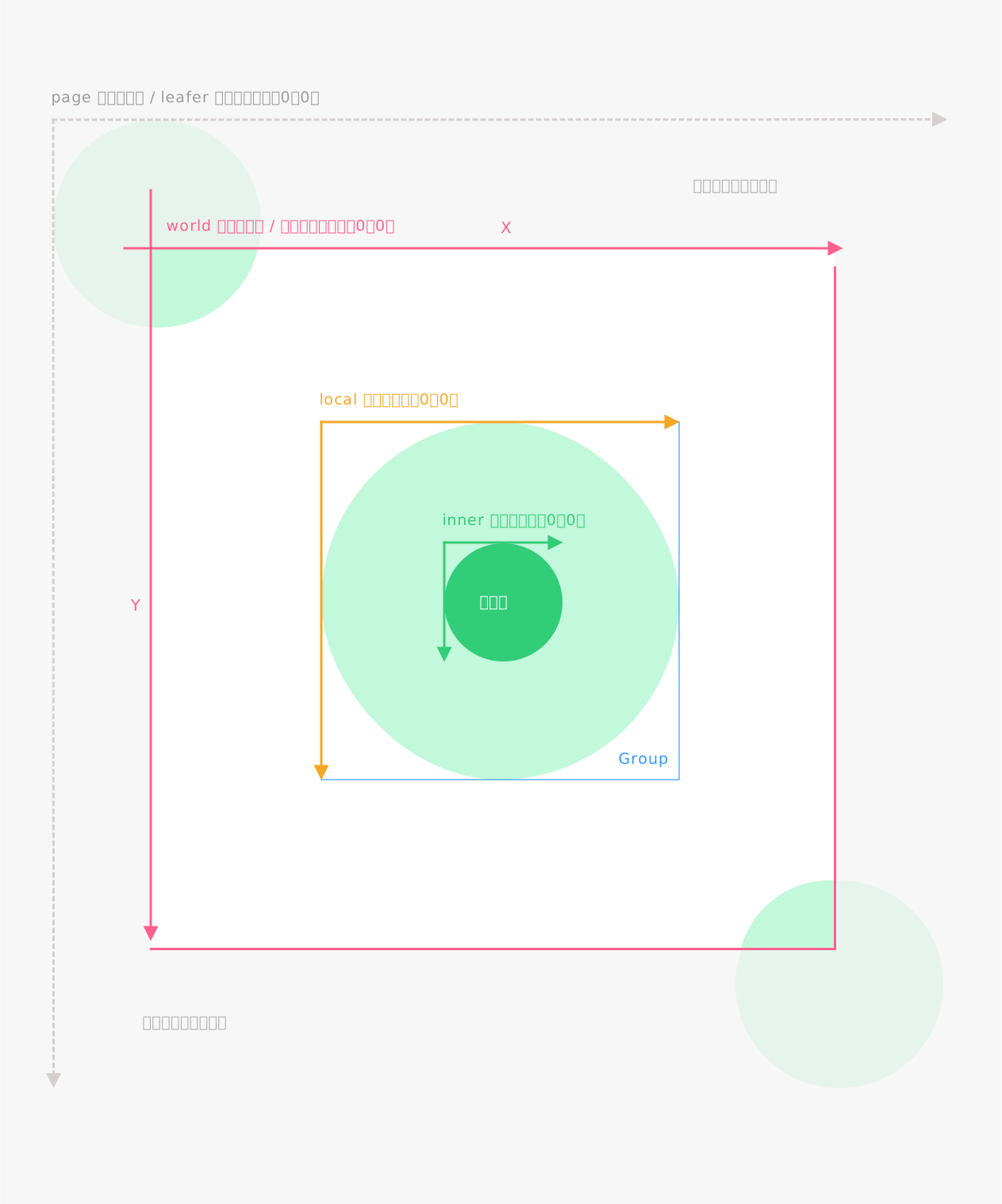
The principle of coordinate transformation is to convert the relationships between these hierarchical transformation properties, eliminating the need for manual calculations.
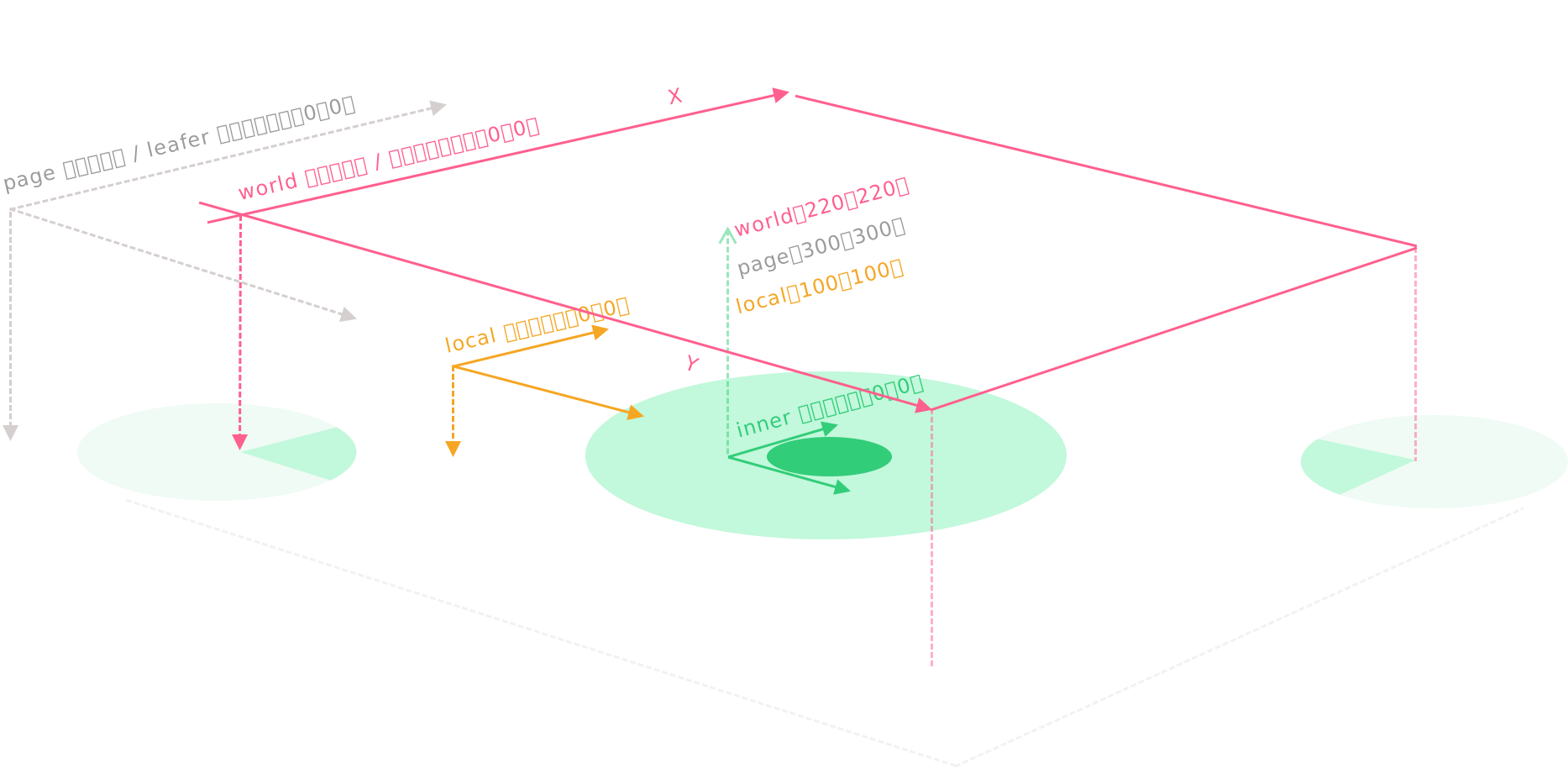
world coordinate system
Coordinates on the canvas, similar to the HTML client coordinate system, with the top-left corner of the canvas as the origin.
page coordinate system
Coordinates inside Leafer or app.tree, similar to the HTML page coordinate system, with the zoom layer as the origin.
local coordinate system
Coordinates relative to the parent element, similar to the HTML offset coordinate system, with the parent element as the origin.
inner coordinate system
Coordinates inside an element or group, with the element’s x, y position as the origin.
box coordinate system
Coordinates inside the element or group box bounds, with the top-left corner of the actual content as the origin.
Examples
We use a pen tool example to understand the role of coordinate transformation
Press and drag the mouse to draw a line, release to finish. After zooming or panning the view, new lines can still be drawn accurately.
// #画笔工具示例
import { Leafer, DragEvent, Pen } from 'leafer-ui'
import '@leafer-in/viewport'

const leafer = new Leafer({ view: window, type: 'design', fill: '#333', })

leafer.add({ tag: 'Text', x: 100, y: 100, text: '按下鼠标拖动开始画线,抬起结束', fill: '#999', fontSize: 16 })

const pen = new Pen()
leafer.add(pen)

// 按下鼠标拖动开始画线,抬起结束,当缩放平移视图后,仍然可以准确绘制新的线条
leafer.on(DragEvent.START, (e: DragEvent) => {
    const point = e.getPagePoint() // 转换事件为 page 坐标 = pen.getPagePoint(e)
    pen.setStyle({ stroke: '#32cd79', strokeWidth: 10, strokeCap: 'round', strokeJoin: 'round' })
    pen.moveTo(point.x, point.y)
})

leafer.on(DragEvent.DRAG, (e: DragEvent) => {
    const point = e.getPagePoint() // 转换事件为 page 坐标 = pen.getPagePoint(e)
    pen.lineTo(point.x, point.y)
})// #画笔工具示例
import { Leafer, DragEvent, Pen } from 'leafer-ui'
import '@leafer-in/viewport'
const leafer = new Leafer({ view: window, type: 'design', fill: '#333', })
leafer.add({ tag: 'Text', x: 100, y: 100, text: '按下鼠标拖动开始画线,抬起结束', fill: '#999', fontSize: 16 })
const pen = new Pen()
leafer.add(pen)
// 按下鼠标拖动开始画线,抬起结束,当缩放平移视图后,仍然可以准确绘制新的线条
leafer.on(DragEvent.START, (e) => {
const inner = e.getPagePoint() // 转换事件为 page 坐标 = pen.getPagePoint(e)
pen.setStyle({ stroke: '#32cd79', strokeWidth: 10, strokeCap: 'round', strokeJoin: 'round' })
pen.moveTo(inner.x, inner.y)
})
leafer.on(DragEvent.DRAG, (e) => {
const inner = e.getPagePoint() // 转换事件为 page 坐标 = pen.getPagePoint(e)
pen.lineTo(inner.x, inner.y)
})Drag to create shapes
When dragging a DOM element into the canvas to create shapes, browser native coordinate conversion is required.
// #拖拽创建图形 [添加到 tree]
import { App, Rect, Ellipse } from 'leafer-ui'
import '@leafer-in/editor' // 导入图形编辑器插件
import '@leafer-in/viewport' // 导入视口插件 (可选)

// 创建可拖拽的 dom 图形(圆形、矩形)
document.body.innerHTML = `
<div id="circle" draggable="true" style="width: 50px; height: 50px; border-radius: 25px; background-color: #32cd79; cursor: move; display: inline-block" ></div>
<div id="rect" draggable="true" style="width: 50px; height: 50px; background-color: #32cd79; cursor: move; display: inline-block" ></div>
<div id="leafer" style="position: absolute; top: 70px; right: 0; bottom: 0; left: 0;"></div>
`

// 创建应用
const app = new App({ view: 'leafer', fill: '#333', editor: {} })

app.tree.add({ tag: 'Text', x: 100, y: 100, text: '可拖拽上方图形到这里', fill: '#999', fontSize: 16 })


// 设置拖拽数据
document.getElementById('rect').addEventListener('dragstart', function (e) {
    e.dataTransfer.setData("type", 'rect')
})

document.getElementById('circle').addEventListener('dragstart', function (e) {
    e.dataTransfer.setData("type", 'circle')
})


// 让画布可以接收拖拽内容
document.getElementById('leafer').addEventListener('dragover', function (e) {
    e.preventDefault()
})

// 拖拽释放,创建相应图形
document.getElementById('leafer').addEventListener('drop', function (e) {
    const type = e.dataTransfer.getData("type")
    const point = app.getPagePointByClient(e) // 浏览器原生事件的 client 坐标 转 应用的 page 坐标
    if (type === 'rect') {
        app.tree.add(Rect.one({ fill: '#32cd79', editable: true }, point.x, point.y))
    } else if (type === 'circle') {
        app.tree.add(Ellipse.one({ fill: '#32cd79', editable: true }, point.x, point.y))
    }
})// #拖拽创建图形 [添加到 Frame]
import { App, Frame, Rect, Ellipse } from 'leafer-ui'
import '@leafer-in/editor' // 导入图形编辑器插件
import '@leafer-in/viewport' // 导入视口插件 (可选)
// 创建可拖拽的 dom 图形(圆形、矩形)
document.body.innerHTML = `
<div id="circle" draggable="true" style="width: 50px; height: 50px; border-radius: 25px; background-color: #32cd79; cursor: move; display: inline-block" ></div>
<div id="rect" draggable="true" style="width: 50px; height: 50px; background-color: #32cd79; cursor: move; display: inline-block" ></div>
<div id="leafer" style="position: absolute; top: 70px; right: 0; bottom: 0; left: 0;"></div>
`
// 创建应用
const app = new App({ view: 'leafer', fill: '#333', editor: {} })
const frame = Frame.one({
children: [{ tag: 'Text', x: 100, y: 100, text: '可拖拽上方图形到这里', fill: '#999', fontSize: 16 }]
}, 100, 100, 500, 500)
app.tree.add(frame)
// 设置拖拽数据
document.getElementById('rect').addEventListener('dragstart', function (e) {
e.dataTransfer.setData("type", 'rect')
})
document.getElementById('circle').addEventListener('dragstart', function (e) {
e.dataTransfer.setData("type", 'circle')
})
// 让画布可以接收拖拽内容
document.getElementById('leafer').addEventListener('dragover', function (e) {
e.preventDefault()
})
// 拖拽释放,创建相应图形
document.getElementById('leafer').addEventListener('drop', function (e) {
const type = e.dataTransfer.getData("type")
const point = app.getWorldPointByClient(e) // 浏览器原生事件的 client 坐标 转 世界坐标
const framePoint = frame.getInnerPoint(point) // 世界坐标 再转 frame 内坐标
if (type === 'rect') {
frame.add(Rect.one({ fill: '#32cd79', editable: true }, framePoint.x, framePoint.y))
} else if (type === 'circle') {
frame.add(Ellipse.one({ fill: '#32cd79', editable: true }, framePoint.x, framePoint.y))
}
})Transformation methods
Coordinate transformation methods in events
UIEvent PointerEvent DragEvent MoveEvent
Coordinate transformation methods on elements
| Name | Description |
|---|---|
| worldTransform | Transformation matrix relative to world coordinates, including scaleX, scaleY, used as factors for coordinate conversion |
| localTransform | Transformation matrix relative to parent element, used as factors for coordinate conversion |
| getPagePoint() | Get page coordinates (world → page), supports distance conversion |
| getLocalPoint() | Get local coordinates (world → local), supports distance conversion |
| getInnerPoint() | Get inner coordinates (world → inner), supports distance conversion |
| getBoxPoint() | Get box coordinates (world → box), supports distance conversion |
| getWorldPointByPage() | Get world coordinates (page → world), supports distance conversion |
| getWorldPointByLocal() | Get world coordinates (local → world), supports distance conversion |
| getInnerPointByLocal() | Get inner coordinates (local → inner), supports distance conversion |
| getWorldPoint() | Get world coordinates (inner → world), supports distance conversion |
| getLocalPointByInner() | Get local coordinates (inner → local), supports distance conversion |
| getBoxPointByInner() | Get box coordinates (inner → box), supports distance conversion |
| getWorldPointByBox() | Get world coordinates (box → world), supports distance conversion |
| getInnerPointByBox() | Get inner coordinates (box → inner), supports distance conversion |
Browser native event coordinate methods
| Name | Description |
|---|---|
| getWorldPointByClient() | Get world coordinates (browser client → world), only available on App or Leafer instances |
| getPagePointByClient() | Get page coordinates (browser client → page), only available on App or Leafer instances |