
Leafer
Create a Leafer engine. Learn about initialization engine configuration and viewport interaction.
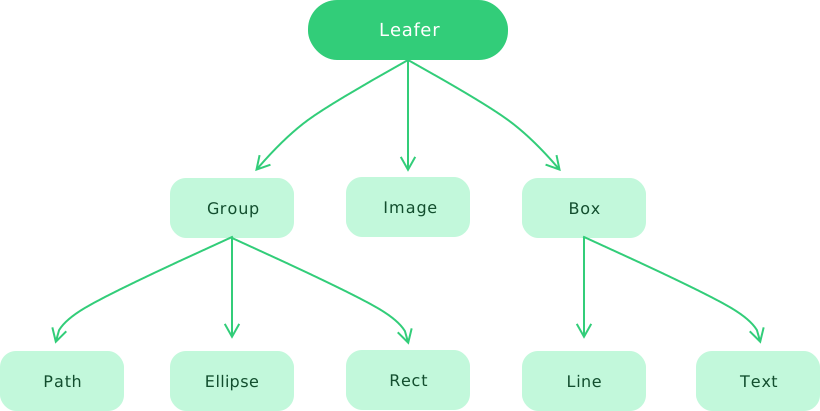
Key Properties
app: App | Leafer
App instance. If it does not exist, it is itself.
isApp: boolean
Whether it is an App instance. Defaults to false.
width: number
Get/set canvas width.
If set to an empty value, it will use automatic layout (using the actual canvas parent div or other container as the layout container).
height: number
Get/set canvas height.
If set to an empty value, it will use automatic layout (using the actual canvas parent div or other container as the layout container).
pixelRatio: number
Get/set canvas pixel ratio. Defaults to the device pixel ratio (1 for normal screens, 2 for high-DPI screens, 3 for ultra-high-DPI screens).
fill: string
Get/set canvas background color.
hittable: boolean
Whether it responds to interaction events. Defaults to true.
hitChildren: boolean
Whether child elements respond to interaction events. Defaults to true.
config: ILeaferConfig
Engine configuration object. Some configuration options can be modified at runtime and take effect immediately.
canvas: ILeaferCanvas
Cross-platform canvas wrapper object.
Get the real canvas object:
You can combine it with the RenderEvent.END event to drawImage() onto another small canvas for high-performance overview rendering.
Viewport Properties (viewport)
zoomLayer: Group
Zoom/pan layer. Defaults to the Leafer itself. You can assign a custom zoom layer.
You can manually modify its x, y, scale, scaleX, and scaleY to control viewport transform. You can also listen to viewport events.
The view control plugin and scrollbar plugin can be used for convenient viewport control, including centering content or focusing on specific elements.
Canvas translation (move)
x: number
Canvas translation on the x-axis.
y: number
Canvas translation on the y-axis.
Canvas scaling (zoom)
scaleX: number
Scale on the x-axis. Negative values indicate horizontal mirroring.
scaleY: number
Scale on the y-axis. Negative values indicate vertical mirroring.
Computed Property
scale: number | [IPointData](../interface/math/Math.md#ipointdata)
Quickly set/get scaleX and scaleY.
app.tree.scale = 2 // scaleX = 2, scaleY = 2
console.log(app.tree.scale) // 2

app.tree.scale = { x: 1, y: 2 } // scaleX = 1, scaleY = 2
console.log(app.tree.scale) // {x:1, y:2}
State Properties
created: boolean
Whether the engine and all child elements have been created (initial creation completed).
ready: boolean
Whether the engine is ready (initial layout completed).
viewReady: boolean
Whether the view is ready (first render completed).
viewCompleted: boolean
Whether the view has fully completed loading (all images in the canvas loaded and rendered). This value may change over time.
running: boolean
Whether the engine is running.
FPS: number
Real-time rendering frame rate. Defaults to the display refresh rate (usually 60 FPS, up to 120 FPS).
You can configure maxFPS to limit rendering FPS and save performance.
layoutLocked: boolean
Whether layout is locked. Can be unlocked via unlockLayout().
cursorPoint: IPointData
Current cursor position in world coordinates.
clientBounds: IBoundsData
Canvas position and size in browser client coordinates.
You can use getWorldPointByClient() to convert native browser event coordinates to engine coordinates.
Auxiliary Properties
zIndex: number
In App mode, controls stacking order within App. Defaults to 0.
Cache Properties
Requires the find element plugin. In App mode, must be set on child Leafer instances.
cacheId: boolean
Whether to cache element IDs globally at creation time to speed up id lookup.
cacheInnerId: boolean
Whether to cache innerId globally at creation time to speed up innerId lookup.
When enabling cacheInnerId, cacheId must also be enabled.
Static Properties
list: Leafer[]
All currently created Leafer engine instances.
Key Methods
resize ( size: IScreenSizeData )
Resize the canvas.
waitInit ( item: function, bind?: object )
Execute after engine initialization completes. If already initialized, executes immediately.
waitReady ( item: function, bind?: object )
Execute after first layout completes.
waitViewReady ( item: function, bind?: object )
Execute after first render completes.
waitViewCompleted ( item: function, bind?: object )
Execute after all images in the canvas have finished loading and rendering.
forceRender ( bounds?: IBoundsData, sync?: boolean )
Force rendering (async). Optionally supports partial region rendering.
When sync is true, rendering is executed synchronously.
updateCursor ( cursor?: ICursorType )
Update cursor style. Defaults to the hovered element’s cursor.
start ( )
Start/restart the engine.
stop ( )
Stop the engine (rendering and layout stop, but state is retained).
clear ( )
Clear all child elements (remove + destroy).
destroy ( sync?: boolean )
Destroy the engine. Defaults to async destruction.
Helper Methods
updateClientBounds ( )
Force update of clientBounds.
getWorldPointByClient ( clientPoint: IClientPointData, update?: boolean ): IPointData
Convert browser client coordinates to world coordinates.
getPagePointByClient ( clientPoint: IClientPointData, update?: boolean ): IPointData
Convert browser client coordinates to page coordinates.
interface IClientPointData {
  clientX: number
  clientY: number
}
Layout Methods
lockLayout ( )
Lock layout. Forces an update before locking, then suspends layout updates until unlocked.
unlockLayout ( )
Unlock layout and apply pending updates.
leafer.lockLayout()

list.forEach((target) => {
  target.rotateOf(target.getInnerPoint(worldOrigin), rotation)
})

leafer.unlockLayout()
Configuration
Engine configuration
View
Viewport control
Events
LeaferEvent
ChildEvent
PropertyEvent
WatchEvent
LayoutEvent
RenderEvent
KeyEvent
ResizeEvent
Inheritance
Leafer > Group > UI
Examples
Create fixed size Leafer
// #创建固定宽高的 Leafer [div]
import { Leafer, Rect } from 'leafer-ui'

const div = document.createElement('div')
document.body.appendChild(div)

const leafer = new Leafer({
    view: div, // view 参数支持设置 div 标签对象
    width: 600, // 不能设置为 0, 否则会变成自动布局
    height: 600,
    fill: '#333'
})

leafer.add(Rect.one({ fill: '#32cd79', draggable: true }, 100, 100))// #创建固定宽高的 Leafer [canvas]
import { Leafer, Rect } from 'leafer-ui'
const canvas = document.createElement('canvas')
document.body.appendChild(canvas)
const leafer = new Leafer({
view: canvas, // view 参数支持设置 canvas 标签对象
width: 600, // 不能设置为 0, 否则会变成自动布局
height: 600,
fill: '#333'
})
leafer.add(Rect.one({ fill: '#32cd79', draggable: true }, 100, 100))// #创建固定宽高的 Leafer [id]
import { Leafer, Rect } from 'leafer-ui'
const div = document.createElement('div')
div.setAttribute('id', 'leafer-view')
document.body.appendChild(div)
const leafer = new Leafer({
view: 'leafer-view', // view 参数支持使用id字符串(不用加 # 号)
width: 600, // 不能设置为 0, 否则会变成自动布局
height: 600,
fill: '#333'
})
leafer.add(Rect.one({ fill: '#32cd79', draggable: true }, 100, 100))Create auto layout Leafer
Create auto-growing Leafer
Independent zoom layer
// #单独指定缩放层 [Leafer]
import { Leafer, Group, Rect } from 'leafer-ui'
import '@leafer-in/viewport' // 导入视口插件
const leafer = new Leafer({ view: window, type: 'viewport' })
const group = new Group()
leafer.add(group)
// #单独指定缩放层 [App]
import { App, Group, Rect } from 'leafer-ui'
import '@leafer-in/viewport' // 导入视口插件
const app = new App({ view: window, tree: { type: 'viewport' } })
const group = new Group()
app.tree.add(group)
Listen to browser unload destroy
Listen to scale change events
// #监听 Leafer 事件 - 缩放变化事件
import { Leafer, Rect, LeaferEvent } from 'leafer-ui'
import '@leafer-in/viewport' // 导入视口插件

const leafer = new Leafer({ view: window, type: 'viewport' })

const rect = new Rect({ x: 100, y: 100, fill: '#32cd79', draggable: true })

leafer.add(rect)

leafer.on(LeaferEvent.SCALE, function () {
    // 缩放视图、或修改scale后,这里可以实时收到缩放比例变化
    console.log('leafer.scale', leafer.scaleX)
})