
around
Draw elements around the around point, similar to the anchor point feature in game engines.
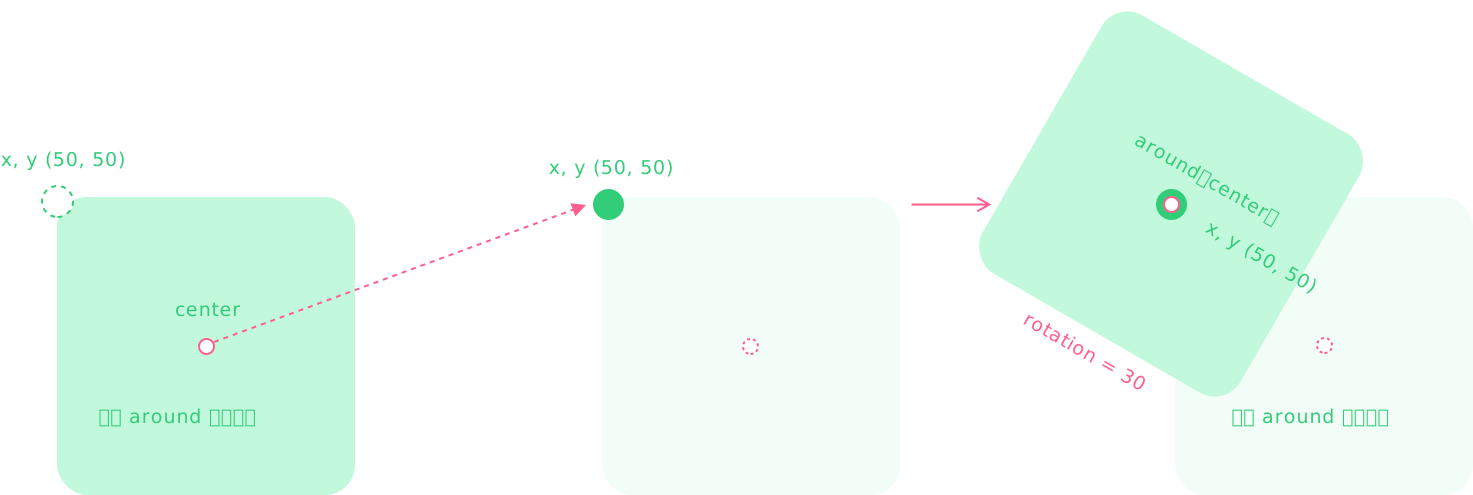
In the diagram, the internal around coordinate point of the element (center position) is moved so that it aligns with the element’s (x, y) position, and then rotated by 30 degrees.
Difference from origin: there is an extra step where the internal around point is moved to the element’s (x, y) coordinate.
Key Properties
around: IAlign | IUnitPointData
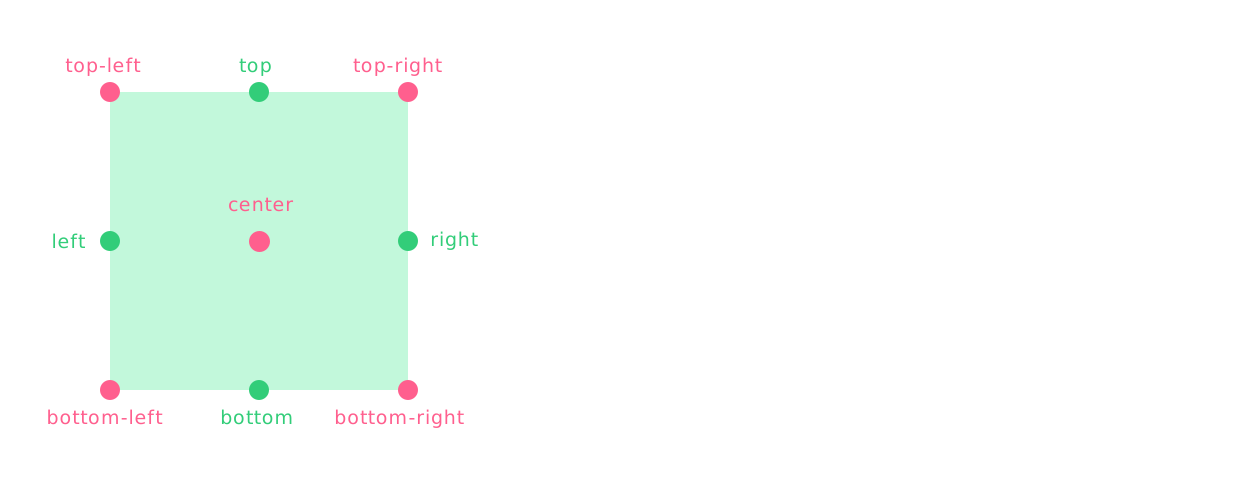
The internal around point of the element, positioned relative to the element’s actual content. Supported by basic elements and Group.
ts
// Alignment
type IAlign =
  | 'top-left'
  | 'top'
  | 'top-right'
  | 'right'
  | 'bottom-right'
  | 'bottom'
  | 'bottom-left'
  | 'left'
  | 'center'

rect.around = 'center'

// Coordinate point
interface IUnitPointData {
  type?: 'percent' | 'px'
  x: number
  y: number
}

rect.around = {
  type: 'percent',
  x: 0.5, // 50% width (percentage coordinate)
  y: 0.5, // 50% height
}

rect.around = {
  x: 50, // 50px coordinate
  y: 50, // 50px
}
Keep position unchanged when switching the around point: localTransform, setTransform()
ts
// original around of polygon
polygon.around = 'center'

// switch around point
const transform = { ...polygon.localTransform } // capture transform

polygon.around = 'right'

polygon.setTransform(transform) // reset transform, automatically handles around changes
Belongs to
UI Elements
Examples
Draw centered at coordinate (50,50)
ts
// #around 属性 [围绕坐标 (50,50) 为中心进行绘制 (Leafer)]
import { Leafer, Rect, Frame } from 'leafer-ui'

const leafer = new Leafer({ view: window })

const rect = new Rect({
    x: 50,
    y: 50,
    width: 50,
    height: 50,
    around: 'center',
    fill: '#4DCB71',
    draggable: true
})

leafer.add(new Frame({ width: 100, height: 100, fill: '#FF4A2C', children: [rect] }))
ts
// #around 属性 [围绕坐标 (50,50) 为中心进行绘制 (App)]
import { App, Rect, Frame } from 'leafer-ui'
import '@leafer-in/editor' // 导入图形编辑器插件
import '@leafer-in/viewport' // 导入视口插件 (可选)

const app = new App({ view: window, editor: {} })

const rect = new Rect({
    x: 50,
    y: 50,
    width: 50,
    height: 50,
    around: 'center',
    fill: '#4DCB71',
    draggable: true
})

app.tree.add(new Frame({ width: 100, height: 100, fill: '#FF4A2C', children: [rect] }))
Scale 1.5x around coordinate (50,50)
ts
// #around 属性 [围绕坐标(50,50) 为中心缩放 1.5 倍 (Leafer)]
import { Leafer, Rect, Frame } from 'leafer-ui'

const leafer = new Leafer({ view: window })

const rect = new Rect({
    x: 50,
    y: 50,
    width: 50,
    height: 50,
    around: 'center',
    scale: 1.5, // scaleX = scaleY = 1.5
    fill: '#4DCB71',
    draggable: true
})

leafer.add(new Frame({ width: 100, height: 100, fill: '#FF4A2C', children: [rect] }))
ts
// #around 属性 [围绕坐标(50,50) 为中心缩放 1.5 倍 (App)]
import { App, Rect, Frame } from 'leafer-ui'
import '@leafer-in/editor' // 导入图形编辑器插件
import '@leafer-in/viewport' // 导入视口插件 (可选)

const app = new App({ view: window, editor: {} })

const rect = new Rect({
    x: 50,
    y: 50,
    width: 50,
    height: 50,
    around: 'center',
    scale: 1.5, // scaleX = scaleY = 1.5
    fill: '#4DCB71',
    draggable: true
})

app.tree.add(new Frame({ width: 100, height: 100, fill: '#FF4A2C', children: [rect] }))
Rotate 45° around coordinate (50,50)
ts
// #around 属性 [围绕坐标(50,50) 为中心旋转 45 度 (Leafer)]
import { Leafer, Rect, Frame } from 'leafer-ui'

const leafer = new Leafer({ view: window })

const rect = new Rect({
    x: 50,
    y: 50,
    width: 50,
    height: 50,
    around: 'center',
    rotation: 45,
    fill: '#4DCB71',
    draggable: true
})

leafer.add(new Frame({ width: 100, height: 100, fill: '#FF4A2C', children: [rect] }))
ts
// #around 属性 [围绕坐标(50,50) 为中心旋转 45 度 (App)]
import { App, Rect, Frame } from 'leafer-ui'
import '@leafer-in/editor' // 导入图形编辑器插件
import '@leafer-in/viewport' // 导入视口插件 (可选)

const app = new App({ view: window, editor: {} })

const rect = new Rect({
    x: 50,
    y: 50,
    width: 50,
    height: 50,
    around: 'center',
    rotation: 45,
    fill: '#4DCB71',
    draggable: true
})

app.tree.add(new Frame({ width: 100, height: 100, fill: '#FF4A2C', children: [rect] }))
Skew 45° around coordinate (50,50)
ts
// #around 属性 [围绕坐标(50,50) 为中心倾斜 45 度 (Leafer)]
import { Leafer, Rect, Frame } from 'leafer-ui'

const leafer = new Leafer({ view: window })

const rect = new Rect({
    x: 50,
    y: 50,
    width: 50,
    height: 50,
    around: 'center',
    skewX: 45,
    fill: '#4DCB71',
    draggable: true
})

leafer.add(new Frame({ width: 100, height: 100, fill: '#FF4A2C', children: [rect] }))
ts
// #around 属性 [围绕坐标(50,50) 为中心倾斜 45 度 (App)]
import { App, Rect, Frame } from 'leafer-ui'
import '@leafer-in/editor' // 导入图形编辑器插件
import '@leafer-in/viewport' // 导入视口插件 (可选)

const app = new App({ view: window, editor: {} })

const rect = new Rect({
    x: 50,
    y: 50,
    width: 50,
    height: 50,
    around: 'center',
    skewX: 45,
    fill: '#4DCB71',
    draggable: true
})

app.tree.add(new Frame({ width: 100, height: 100, fill: '#FF4A2C', children: [rect] }))
around point (50,50) at bottom-right of rectangle
ts
// #around 属性 [around 坐标点 (50,50) 在矩形的右下角 (Leafer)]
import { Leafer, Rect, Frame } from 'leafer-ui'

const leafer = new Leafer({ view: window })

const rect = new Rect({
    x: 50,
    y: 50,
    width: 50,
    height: 50,
    around: 'bottom-right',
    fill: '#4DCB71',
    draggable: true
})

leafer.add(new Frame({ width: 100, height: 100, fill: '#FF4A2C', children: [rect] }))
ts
// #around 属性 [around 坐标点 (50,50) 在矩形的右下角 (App)]
import { App, Rect, Frame } from 'leafer-ui'
import '@leafer-in/editor' // 导入图形编辑器插件
import '@leafer-in/viewport' // 导入视口插件 (可选)

const app = new App({ view: window, editor: {} })

const rect = new Rect({
    x: 50,
    y: 50,
    width: 50,
    height: 50,
    around: 'bottom-right',
    fill: '#4DCB71',
    draggable: true
})

app.tree.add(new Frame({ width: 100, height: 100, fill: '#FF4A2C', children: [rect] }))