
LinearGradient Object
Linear gradient object, can be assigned to the fill or stroke property.
Key Properties
type: string
The fill type is linear.
from?: IAlign | IUnitPointData
The starting control point of the gradient, positioned relative to the actual content of the element. Default is top.
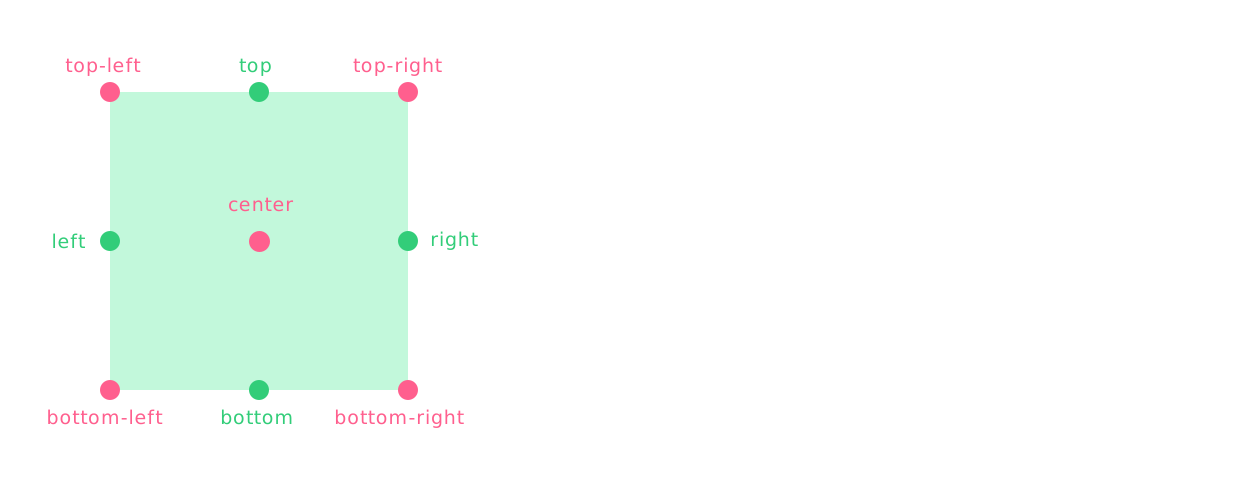
// Alignment
type IAlign =
  | 'top-left'
  | 'top'
  | 'top-right'
  | 'right'
  | 'bottom-right'
  | 'bottom'
  | 'bottom-left'
  | 'left'
  | 'center'

from: 'top'

// Coordinate point
interface IUnitPointData {
  type?: 'percent' | 'px'
  x: number
  y: number
}

from: {
  type: 'percent',
  x: 0.5, // 50% width  percentage coordinate point
  y: 0, // 0% height
}

from: {
  x: 50, // 50px pixel coordinate point
  y: 0, //  0px
}
to?: IAlign | IUnitPointData
The ending control point of the gradient, positioned relative to the actual content of the element. Default is bottom.
stops: ColorStop[] | StringColor[]
Array of gradient color stops.
If an array of pure string colors is provided, the offset will be calculated automatically.
Basic Properties
blendMode?: BlendMode
Blend mode, default is normal.
visible?: boolean
Whether it is visible, default is true.
opacity?: number
Opacity, default is 1. If the color in gradient stops is not a color object, the color plugin must be installed to take effect.
Sub-stroke Properties
style?: IStrokeStyle
When multiple strokes are set for an element, you can configure the sub-stroke style style to override the main stroke style.
This can create effects such as dashed lines, or simulate inner, middle, and outer triple strokes. Learn more.
Belongs To
UI Element
Examples
Default Direction
Gradient drawn vertically from top center -> bottom center
// #线性渐变填充 [默认方向 (App)]
import { App, Rect } from 'leafer-ui'
import '@leafer-in/editor' // 导入图形编辑器插件
import '@leafer-in/viewport' // 导入视口插件 (可选)

const app = new App({ view: window, editor: {} })

const rect = new Rect({
    width: 100,
    height: 100,
    fill: {
        type: 'linear', // 从顶部居中 -> 底部居中垂直绘制的渐变
        stops: ['#FF4B4B', '#FEB027']
    },
})

app.tree.add(rect)
Control Direction
Gradient drawn at 45 degrees from top-left -> bottom-right.
// #线性渐变填充 [控制方向 (Leafer)]
import { Leafer, Rect } from 'leafer-ui'

const leafer = new Leafer({ view: window })

const rect = new Rect({
    width: 100,
    height: 100,
    fill: {
        type: 'linear', // 从左上角 -> 右下角呈 45 度绘制的渐变
        from: 'top-left',
        to: 'bottom-right',
        stops: [{ offset: 0, color: '#FEB027' }, { offset: 1, color: '#79CB4D' }]
    },
})

leafer.add(rect)// #线性渐变填充 [控制方向 (App)]
import { App, Rect } from 'leafer-ui'
import '@leafer-in/editor' // 导入图形编辑器插件
import '@leafer-in/viewport' // 导入视口插件 (可选)
const app = new App({ view: window, editor: {} })
const rect = new Rect({
width: 100,
height: 100,
fill: {
type: 'linear', // 从左上角 -> 右下角呈 45 度绘制的渐变
from: 'top-left',
to: 'bottom-right',
stops: [{ offset: 0, color: '#FEB027' }, { offset: 1, color: '#79CB4D' }]
},
})
app.tree.add(rect)Set Opacity
Generally used for stacking multiple fills.
When color is a color object, opacity takes effect directly. If it is not a color object, the color plugin must be installed, or directly use a string color like rgba(255,75,75,0,5).
// #线性渐变填充 [设置不透明度 (Leafer)]
import { Leafer, Rect } from 'leafer-ui'

const leafer = new Leafer({ view: window })

const rect = new Rect({
    width: 100,
    height: 100,
    fill: {
        type: 'linear',
        opacity: 0.5,
        stops: [
            { offset: 0, color: { r: 255, g: 75, b: 75 } },
            { offset: 1, color: { r: 254, g: 176, b: 39 } }
        ]
    },
})

leafer.add(rect)// #线性渐变填充 [设置不透明度 (App)]
import { App, Rect } from 'leafer-ui'
import '@leafer-in/editor' // 导入图形编辑器插件
import '@leafer-in/viewport' // 导入视口插件 (可选)
const app = new App({ view: window, editor: {} })
const rect = new Rect({
width: 100,
height: 100,
fill: {
type: 'linear',
opacity: 0.5,
stops: [
{ offset: 0, color: { r: 255, g: 75, b: 75 } },
{ offset: 1, color: { r: 254, g: 176, b: 39 } }
]
},
})
app.tree.add(rect)