
Robot Game Element
The Robot element is similar to a sprite in games. It integrates frame playback and predefined actions, allowing you to quickly create game characters with walking and attacking animations.
Note
You must install the Robot plugin to use this feature, or install leafer-game, which already includes the Robot plugin.
You can provide a list of images, or one or multiple sprite sheets containing animation states. These actions will be automatically indexed, as shown below:
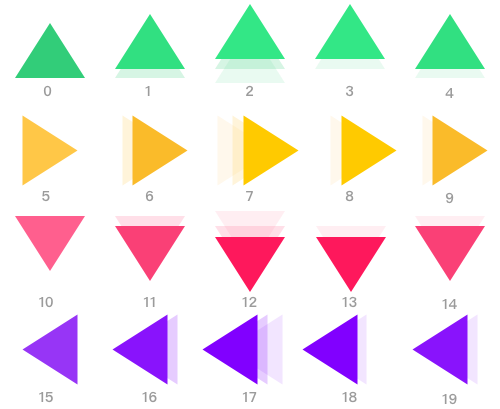
Try holding and releasing different arrow keys.
ts
// #创建 Robot 游戏元素
import { Leafer, KeyEvent } from 'leafer-ui'
import { Robot } from '@leafer-in/robot' // 导入 robot 插件

const leafer = new Leafer({ view: window })

const robot = new Robot({
    robot: { url: '/image/arrows.png', size: { width: 100, height: 100 }, total: 20 },
    actions: {  // 预设游戏动作(通过动作帧)
        up: 0, // 静止向上的箭头( 编号为0的动作帧)
        right: 5,
        down: 10,
        left: 15,
        arrowUp: [0, 1, 2, 3, 4], // 动态向上的箭头(循环播放编号为 1-4 的动作帧)
        arrowRight: [5, 6, 7, 8, 9],
        arrowDown: [10, 11, 12, 13, 14],
        arrowLeft: [15, 16, 17, 18, 19]
    },
    action: 'arrowRight' // 设置动作:动态向右的箭头
})

leafer.add(robot)

// 监听方向键进行交互

let speed = 5

leafer.on(KeyEvent.DOWN, (e: KeyEvent) => {
    speed++
    switch (e.code) { // 动态的方向箭头
        case 'ArrowUp':
            robot.action = 'arrowUp'
            robot.y -= speed
            break
        case 'ArrowDown':
            robot.action = 'arrowDown'
            robot.y += speed
            break
        case 'ArrowLeft':
            robot.action = 'arrowLeft'
            robot.x -= speed
            break
        case 'ArrowRight':
            robot.action = 'arrowRight'
            robot.x += speed
            break
    }
})

leafer.on(KeyEvent.UP, (e: KeyEvent) => {
    speed = 5
    switch (e.code) { // 静态的方向箭头
        case 'ArrowUp':
            robot.action = 'up'
            break
        case 'ArrowDown':
            robot.action = 'down'
            break
        case 'ArrowLeft':
            robot.action = 'left'
            break
        case 'ArrowRight':
            robot.action = 'right'
            break
    }
})