
ImagePaint Object
Pattern fill object, can be assigned to the fill or stroke property. Supports using images in svg format.
In repeat mode, 4k images exceeding 4096 x 2160 will be optimized for display.
Key Properties
type: string
The fill type is image.
The fill type also supports film and video, which require installing corresponding extension plugins.
url: string
Image URL, supports Blob URL and Data URL (Base64).
We also provide a Resource, which supports converting original image objects and canvas objects to URLs, and preloading images.
mode?: ImagePaintMode
Pattern fill mode, default is cover.
type ImagePaintMode =
  | 'normal' // normal
  | 'cover' // cover (equivalent to background-size: cover)
  | 'fit' // fit (equivalent to background-size: contain)
  | 'stretch' // stretch, will change image ratio
  | 'clip' // clip
  | 'repeat' // repeat (equivalent to background-repeat: repeat)
format?: 'svg' | 'jpg' | 'png' | 'webp'
Supplementary image format, currently mainly used for svg images that cannot be recognized from the URL.
changeful?: boolean
Whether it changes frequently, default is false.
After setting to true, no additional high-performance pattern will be generated. Commonly used for frequently changing URLs such as game sprites or animated images.
sync?: boolean
Whether to synchronously update the image layer cache, default is false (for performance optimization).
When enabled, scaling the image will not produce blur, but will increase performance cost. Use it appropriately.
Basic Properties
blendMode?: BlendMode
Blend mode, default is normal.
visible?: boolean
Whether it is visible, default is true.
opacity?: number
Opacity, default is 1. Currently only effective for color objects and images.
align: IAlign
Background image alignment, similar to CSS background-position. Not supported in clip mode.
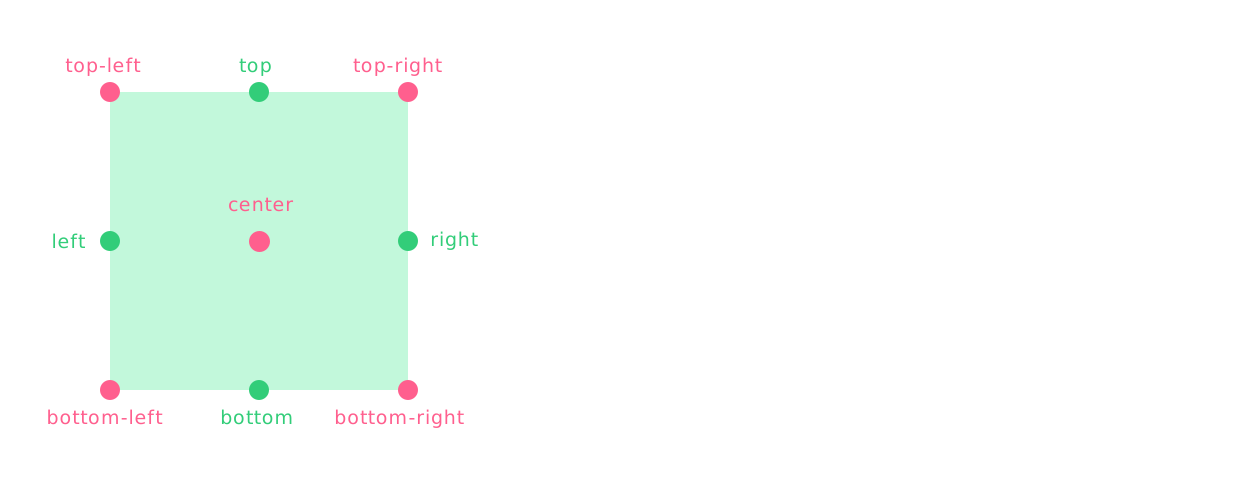
// Alignment
type IAlign =
  | 'top-left'
  | 'top'
  | 'top-right'
  | 'right'
  | 'bottom-right'
  | 'bottom'
  | 'bottom-left'
  | 'left'
  | 'center'
cover Mode Properties
rotation?: number
Rotation angle, rotates in increments of 90 degrees.
fit Mode Properties
rotation?: number
Rotation angle, rotates in increments of 90 degrees.
padding?: IFourNumber
Padding, default is 0.
repeat?: boolean
Whether to repeat the background.
clip Mode Properties
clipSize?: ISizeData
Clip frame size, the clipped content will be automatically stretched to fit the element's width and height.
interface ISizeData {
  width: number // width
  height: number // height
}
offset?: IPointData
Offset position.
size?: number | IOptionSizeData
Image size, automatically converted to scale.
// Set width or height individually, the other side adapts to the original ratio; setting both will stretch
interface IOptionSizeData {
  width?: number // width, when only width is set, height adapts to the original ratio
  height?: number // height, when only height is set, width adapts to the original ratio
}
scale?: number | IPointData
Scale size, priority is given to the scale calculated from size.
rotation?: number
Rotation angle.
repeat Mode Properties
offset?: IPointData
Offset position.
size?: number | IOptionSizeData
Image size, automatically converted to scale.
// Set width or height individually, the other side adapts to the original ratio; setting both will stretch
interface IOptionSizeData {
  width?: number // width, when only width is set, height adapts to the original ratio
  height?: number // height, when only height is set, width adapts to the original ratio
}
scale?: number | IPointData
Scale ratio of repeated images, priority is given to the scale calculated from size.
scaleFixed?: boolean | 'zoom-in'
Fix the global scale ratio of repeated images, not affected by canvas scaling. Default is false.
'zoom-in' means fixed only when zooming in (still follows when zooming out).
rotation?: number
Rotation angle, rotates in increments of 90 degrees.
After enabling freeTransform, any angle can be set.
freeTransform?: boolean
Whether to use free transform. This ignores the special rotation logic and is convenient for manual editing.
gap?: IGap | IPointGap
Spacing between repeated images, default is 0.
// Setting auto / fit will evenly distribute the remaining space. auto minimum is 0, fit allows negative values.
type IGap = number | 'auto' | 'fit'

interface IPointGap {
  x?: IGap // set x-axis spacing individually
  y?: IGap // set y-axis spacing individually
}
interlace?: number | IPercentData | IInterlace
Interlaced arrangement of repeated images.
interface IInterlace {
  type: 'x' | 'y'
  offset: number | IPercentData
}

interface IPercentData {
  type: 'percent'
  value: number
}

// number
interlace: 100 // next row offset 100px on X axis

// percentage
interlace: { type: 'percent', value: 0.5}  // next row offset 50% of pattern size on X axis

// Y-axis interlace
interlace: { // next column offset 50% of pattern size on Y axis
  type: 'y'
  offset:  { type: 'percent', value: 0.5}
}
repeat?: IRepeat
Repeat mode, can set repetition on x or y axis, default repeats both axes.
Also supports setting the number of tiles on x and y axes individually.
type IRepeat = boolean | 'x' | 'y' | IPointData

const repeat = { x: 10, y: 6 } // set number of tiles on x and y axes
Sub-stroke Properties
style?: IStrokeStyle
When multiple strokes are set for an element, you can configure the sub-stroke style style to override the main stroke style.
This can create effects such as dashed lines, or simulate inner, middle, and outer triple strokes. Learn more.
Image Cache
Global configuration for image caching, can be adjusted dynamically as needed.
Image Cross-Origin
Global configuration for image cross-origin, can be adjusted dynamically as needed.
When set to null, cross-origin images not allowed by the server can be rendered, but exporting the canvas content is not supported (browser limitation).
Resource
We also provide a Resource, which can preload images. Original image objects and canvas objects can be converted to URLs.
All images in the engine are loaded in an orderly and parallel manner through the Resource. When images are no longer used, they enter a recycle list and will be automatically destroyed when the threshold is reached.
Image Events
ImageEvent
Belongs To
UI Element
Examples
cover Mode
// #图案填充 [默认 cover 覆盖模式 (App)]
import { App, Rect } from 'leafer-ui'
import '@leafer-in/editor' // 导入图形编辑器插件
import '@leafer-in/viewport' // 导入视口插件 (可选)

const app = new App({ view: window, editor: {} })

const rect = new Rect({
    width: 100,
    height: 100,
    fill: {
        type: 'image',
        url: '/image/leafer.jpg',
        // mode: 'cover' // 默认模式,相当于 CSS 的 background-size: cover
    }
})

app.tree.add(rect)
cover Mode rotated 90 degrees
// #图案填充 [cover 覆盖模式旋转 90 度 (App)]
import { App, Rect } from 'leafer-ui'
import '@leafer-in/editor' // 导入图形编辑器插件
import '@leafer-in/viewport' // 导入视口插件 (可选)

const app = new App({ view: window, editor: {} })

const rect = new Rect({
    width: 100,
    height: 100,
    fill: {
        type: 'image',
        url: '/image/leafer.jpg',
        rotation: 90
    }
})

app.tree.add(rect)
fit Mode
// #图案填充 [fit 适应模式 (App)]
import { App, Rect } from 'leafer-ui'
import '@leafer-in/editor' // 导入图形编辑器插件
import '@leafer-in/viewport' // 导入视口插件 (可选)

const app = new App({ view: window, editor: {} })

const rect = new Rect({
    width: 100,
    height: 100,
    fill: {
        type: 'image',
        url: '/image/leafer.jpg',
        mode: 'fit' // 相当于 CSS 的 background-size: contain
    }
})

app.tree.add(rect)
stretch Mode
// #图案填充 [stretch 拉伸模式 (App)]
import { App, Rect } from 'leafer-ui'
import '@leafer-in/editor' // 导入图形编辑器插件
import '@leafer-in/viewport' // 导入视口插件 (可选)

const app = new App({ view: window, editor: {} })

const rect = new Rect({
    width: 100,
    height: 120,
    fill: {
        type: 'image',
        url: '/image/leafer.jpg',
        mode: 'stretch'
    }
})

app.tree.add(rect)
clip Mode
// #图案填充 [clip 裁剪模式 (Leafer)]
import { Leafer, Rect } from 'leafer-ui'

const leafer = new Leafer({ view: window })

const rect = new Rect({
    width: 100,
    height: 100,
    fill: {
        type: 'image',
        url: '/image/leafer.jpg',
        mode: 'clip',
        offset: { x: -40, y: -90 },
        scale: { x: 1.1, y: 1.1 },
        rotation: 20
    }
})

leafer.add(rect)// #图案填充 [clip 裁剪模式 (App)]
import { App, Rect } from 'leafer-ui'
import '@leafer-in/editor' // 导入图形编辑器插件
import '@leafer-in/viewport' // 导入视口插件 (可选)
const app = new App({ view: window, editor: {} })
const rect = new Rect({
width: 100,
height: 100,
fill: {
type: 'image',
url: '/image/leafer.jpg',
mode: 'clip',
offset: { x: -40, y: -90 },
scale: { x: 1.1, y: 1.1 },
rotation: 20
}
})
app.tree.add(rect)repeat Mode
// #图案填充 [repeat 平铺模式 (Leafer)]
import { Leafer, Rect } from 'leafer-ui'

const leafer = new Leafer({ view: window })

const rect = new Rect({
    width: 100,
    height: 100,
    fill: {
        type: 'image',
        url: '/image/leafer.jpg',
        mode: 'repeat', // 相当于 CSS 的 background-repeat: repeat
        scale: 0.2
    }
})

leafer.add(rect)// #图案填充 [repeat 平铺模式 (App)]
import { App, Rect } from 'leafer-ui'
import '@leafer-in/editor' // 导入图形编辑器插件
import '@leafer-in/viewport' // 导入视口插件 (可选)
const app = new App({ view: window, editor: {} })
const rect = new Rect({
width: 100,
height: 100,
fill: {
type: 'image',
url: '/image/leafer.jpg',
mode: 'repeat', // 相当于 CSS 的 background-repeat: repeat
scale: 0.2
}
})
app.tree.add(rect)repeat Mode rotated 90 degrees
// #图案填充 [repeat 平铺模式旋转 90 度 (App)]
import { App, Rect } from 'leafer-ui'
import '@leafer-in/editor' // 导入图形编辑器插件
import '@leafer-in/viewport' // 导入视口插件 (可选)

const app = new App({ view: window, editor: {} })

const rect = new Rect({
    width: 100,
    height: 100,
    fill: {
        type: 'image',
        url: '/image/leafer.jpg',
        mode: 'repeat',
        scale: 0.2,
        rotation: 90
    }
})

app.tree.add(rect)
repeat Mode does not scale with canvas
// #图形编辑器 [背景为透明方格的画板]
import { App, Frame, Rect, Platform } from 'leafer-ui'
import '@leafer-in/editor' // 导入图形编辑器插件
import '@leafer-in/viewport' // 导入视口插件 (可选)

const app = new App({
    view: window,
    fill: '#333',
    editor: {},  //  配置 editor 会自动创建并添加 app.editor 实例、tree 层、sky 层
})

// 平铺的透明方格
const svg = Platform.toURL(
    `<svg width="10" height="10" xmlns="http://www.w3.org/2000/svg">
<rect x="0" y="0" width="5" height="5" fill="#FFF"/><rect x="5" y="0" width="5" height="5" fill="#CCC"/>
<rect x="0" y="5" width="5" height="5" fill="#CCC"/><rect x="5" y="5" width="5" height="5" fill="#FFF"/>
</svg>`, 'svg',)


app.tree.add(Frame.one({ // 背景为透明方格的画板
    fill: {
        type: 'image',
        url: svg,
        mode: 'repeat',
        scaleFixed: 'zoom-in' // true // 固定平铺图比例,不随画布缩放
    },
    shadow: {
        x: 0,
        y: 3,
        blur: 15,
        color: '#0009',
        scaleFixed: 'zoom-in' // 固定阴影比例,不随画布放大
    },
    children: [
        Rect.one({ editable: true, fill: '#FEB027', cornerRadius: [20, 0, 0, 20] }, 100, 100),
        Rect.one({ editable: true, fill: '#FFE04B', cornerRadius: [0, 20, 20, 0] }, 300, 100)
    ]
}, 100, 100, 500, 600))