
Create App Instance
This is an optional application structure, mainly used in scenarios such as the graphic editor that require layered rendering.
The App is responsible for hosting multiple Leafer engine layers that work together, separating content with different update frequencies into different render layers to improve performance.
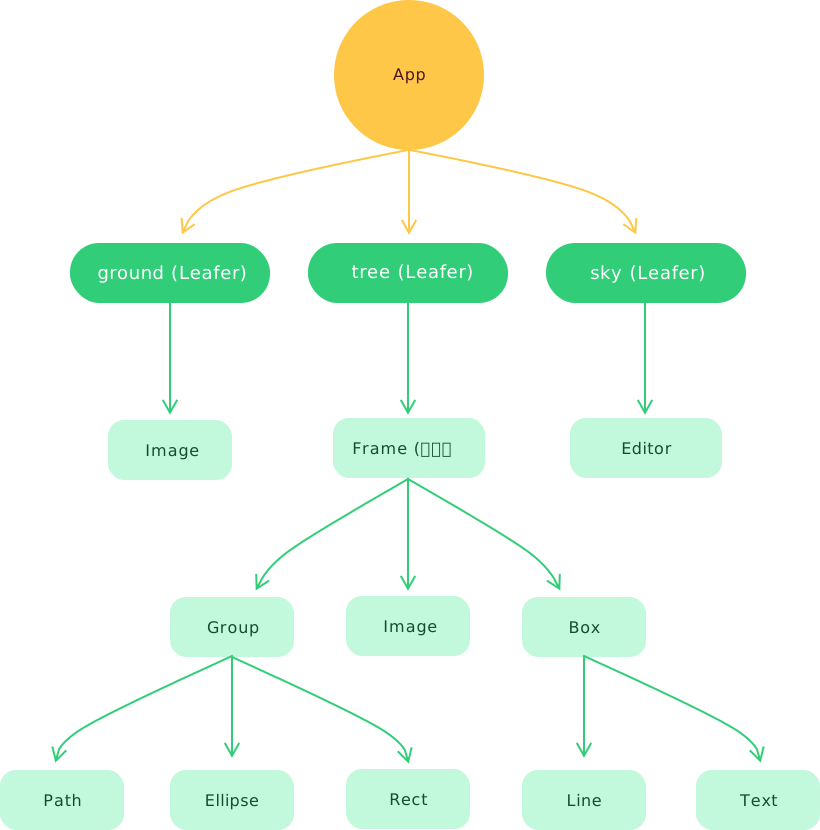
Unified Structure
By default, App can add multiple custom engine layers via the add() method. For easier understanding and communication, we use real-world metaphors to name commonly used Leafer engine layers, and also support quick configuration-based creation.
ground?: Leafer
Ground layer (background layer), the bottom-most Leafer engine, typically used for rendering backgrounds and grid content (optional).
tree: Leafer
Tree structure (main content layer), the middle Leafer engine, equivalent to the <body> in HTML.
sky: Leafer
Sky layer (dynamic layer), the topmost Leafer engine, typically used to render graphic editor instances.
We use the graphic editor as an example to demonstrate the actual usage of App:
// #App结构 - 图形编辑器 [editor]
import { App, Frame, Rect } from 'leafer-ui'
import { Editor } from '@leafer-in/editor' // 导入图形编辑器插件
import '@leafer-in/viewport' // 导入视口插件 (可选)

const app = new App({
    view: window,
    fill: '#333', // 背景色
    tree: { type: 'design' }, // 添加 tree 层
    sky: {}  // 添加 sky 层
})

app.tree.add(Frame.one({ // 页面内容
    children: [
        Rect.one({ editable: true, fill: '#FEB027', cornerRadius: [20, 0, 0, 20] }, 100, 100),
        Rect.one({ editable: true, fill: '#FFE04B', cornerRadius: [0, 20, 20, 0] }, 300, 100)
    ]
}, 100, 100, 500, 600))

app.sky.add(app.editor = new Editor()) // 添加图形编辑器,用于选中元素进行编辑操作// #App结构 - 图形编辑器 [简化]
import { App, Frame, Rect } from 'leafer-ui'
import '@leafer-in/editor' // 导入图形编辑器插件
import '@leafer-in/viewport' // 导入视口插件 (可选)
const app = new App({
view: window,
fill: '#333',
editor: {}, // 配置 editor 会自动创建并添加 app.editor 实例、tree 层、sky 层
// tree: { type: 'design' },
// sky: {}
})
app.tree.add(Frame.one({ // 页面内容
children: [
Rect.one({ editable: true, fill: '#FEB027', cornerRadius: [20, 0, 0, 20] }, 100, 100),
Rect.one({ editable: true, fill: '#FFE04B', cornerRadius: [0, 20, 20, 0] }, 300, 100)
]
}, 100, 100, 500, 600))
// app.sky.add(app.editor = new Editor()) // 添加图形编辑器,用于选中元素进行编辑操作// #App结构 - 图形编辑器 [实现原理]
import { App, Leafer, Frame, Rect } from 'leafer-ui'
import { Editor } from '@leafer-in/editor' // 导入图形编辑器插件
import '@leafer-in/viewport' // 导入视口插件 (可选)
const app = new App({ view: window, fill: '#333' })